Contents
Introduction
English version of an article first published in Polish on 26 October 2026. Read the Polish original.
A Google Business Profile is no longer something you set up once and leave. Since September Google has given owners 4 days to reject edits suggested by others, it removes reviews more often and sometimes blocks new ones, and it has tightened the rules for posts and for contacting support. At the same time, in Poland profile data now reaches new places in search results and AI Overviews that recommend specific businesses.
Google has written some of these changes into its documentation; others are tests spotted on individual profiles. I keep the two apart, because that decides what is worth doing straight away and what is only worth watching. On 26 October I also checked 15 local queries in Częstochowa, Katowice and Kraków to see how Business Profiles look in Polish search results today. The basics, meaning how to set up a profile and get it ranking, are covered in my guide to Google Business Profile. Here I focus on what is new.
What you will learn:
- How long you have to reject an edit someone has suggested to your Business Profile, and what happens if you do not react
- Why reviews disappear from profiles and what the penalties are for reviews collected in exchange for a discount
- Which changes Google has confirmed in its documentation and which are, for now, tests seen on individual profiles
- What my test of 15 local queries in Częstochowa, Katowice and Kraków showed, signed in and signed out: the “Podobne witryny” (Similar sites) block and AI Overviews recommending specific businesses
- How many reviews a customer sees in Maps when not signed in to a Google account
- Why the “website” field in the profile now decides where the customer ends up
- What to do in the coming month, step by step
What has changed in Google Business Profiles?
Most of the changes piled up in the second half of September. Green dots are wording in Google documentation; blue dots are industry observations that Google has not confirmed.
Changes to Google Business Profiles, December 2025 to October 2026
-
31 December 2025
Review link and QR code reach Google Help
the feature had worked since March 2025, now documented, with a ban on incentives
-
March 2026
Calls, texts and WhatsApp messages from Google
automated checks of profile details, with an opt-out
-
July 2026
Reviews disappearing en masse
according to media reports Google looked into it and paused new reviews
-
4 September
Verification with a business photo
seen on individual profiles, not listed in the Polish help page
-
17 September
Business panel as an AI Overview
observed in the US, on mobile
-
18 September
EEA units for local businesses too
update to the Google Search Central documentation
-
22 September
Emails about a spike in spam reviews
reviews removed and new ones temporarily blocked
-
23 September
4 days to reject a suggested edit
wording in Google Business Profile Help
-
24 September
Opening hours set automatically
described in plain text, AI turns it into a schedule
-
25 September
Posts with unverified contact details may disappear
wording in the post content policy
-
29 September
“Misuse of support channels” policy
new section in the Business Profile policies
-
30 September
Sign-in needed to see all reviews in Maps
observed by SER; on 26 October in Poland 5 of 533 reviews were visible signed out
-
15 October
More links in AI Mode and AI Overviews
post on the Google blog
How long do you have to react to an edit to your Google Business Profile?
Anyone can suggest an edit to your Business Profile: a customer, a competitor or Google itself, based on data from the web. Google Business Profile Help now says it plainly: “Once notified, you have 4 days to accept or reject the suggestion.” If you do not react, Google may publish the change automatically, provided other public information, such as your website, supports it.
There is a second provision that few people know about. Google may apply edits suggested by users without prior review if they are needed to comply with its policies. In other words, some changes do not wait for your decision at all. When Google has updates for the profile, a notification appears at the top of the editor and the changed text is marked in blue.
The most common scenario in practice
Notifications go to an inbox nobody reads: a former employee’s, an old agency’s, or an address created only to register the profile. The 4 days then pass without a reaction, and a change of name, category or phone number can appear in the profile without the owner knowing.
When does Google call or message a business?
Contact from Google belongs to the same topic. According to Google Business Profile Help, Google may call, text and send WhatsApp messages to the number in the profile to check that the details are up to date or to help customers, for example with a booking or a question about price. Information given in such a conversation can go into the profile as “Pending”, and reviewing it takes up to 5 business days.
You can turn off automated calls and text messages under Business Profile settings → Advanced settings. For texts and WhatsApp it is enough to reply STOP. The most important sentence on that help page, though, is this one: Google never asks for payment details, a card number or a password. If someone calls “from Google” and wants money to keep your business in the results, it is a scammer.
Why are reviews disappearing from Google Business Profiles?
Reviews have always been the strongest lever a Business Profile has. In 2026 they also became its weakest point, because Google filters them far more strictly.
In early July many owners reported reviews disappearing en masse and no way of adding new ones. According to media reports, Google confirmed it was looking into the matter and said it would restore reviews removed by mistake. In late September, in turn, some owners received emails saying a sudden spike of spam reviews had been detected. Google wrote in them that it had removed such reviews so they would not affect the rating and had temporarily paused new ratings and reviews, usually for a few days. At least one consultant described the case of a business that received such a message despite an ordinary, steady flow of genuine reviews.
What are the penalties for reviews “for a discount”?
Here Google leaves no room for doubt. Offering customers free or discounted products or services in exchange for reviews is, according to Google Business Profile Help, fake engagement, which is strictly prohibited. For breaking the rules Google can place three kinds of restriction on a profile:
01. New reviews blocked
For a set period the profile cannot receive new reviews or ratings.
02. Existing ones unpublished
Existing reviews and ratings disappear from the profile for a set period.
03. Warning for customers
The profile displays a notice that fake reviews were removed.
Google notifies the owner of restrictions by email, and the decision can be appealed. The third restriction is the worst for a business, because every potential customer sees the warning.
Why are not all reviews visible in Google Maps?
On 30 September Search Engine Roundtable reported that you have to sign in to Google Maps to see all the reviews of a business. I checked this on 26 October in Poland, in a signed-out browser, using a salon in Kraków with 533 reviews. The list showed 5 reviews, and below them a “Zobacz więcej opinii (528)” button (See more reviews) and a notice about a limited view of Maps. Sorting worked, but only within those few reviews. Clicking the button opens a window asking you to sign in.
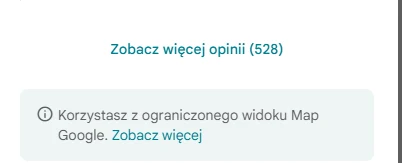
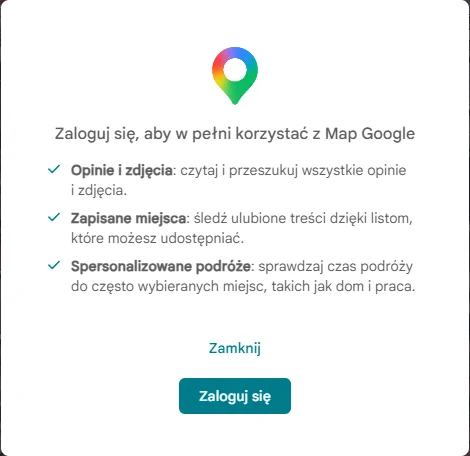
Google has neither announced nor explained this change, and a similar restriction already appeared in February and vanished after a few days. The hypothesis that it is meant to make it harder for bots and AI tools to collect reviews is, for now, only a hypothesis. For a business the conclusion is practical: a customer without a Google account will see only a few reviews, so the newest and most prominently displayed reviews, together with your replies, now make the first impression on behalf of all the others.
How to collect Google reviews with a link and QR code?
Since Google filters reviews more strictly, the safest approach is a steady, unhurried flow of reviews from real customers. Google provides an official tool for that: a link and a QR code for leaving a review. It had worked since March 2025, and at the end of 2025 it reached Google Business Profile Help together with a description of the rules.
- 1Open your Business Profile on a computer. The QR code can currently be generated only in a browser on a computer.
- 2Click “Read reviews”, then “Get more reviews”.
- 3Copy the link or save the QR code as an image.
- 4Put it where the customer finishes dealing with the business: on the receipt or invoice, in the thank-you email, at the end of a chat conversation, on the counter or in the service van.
Asking for a review is fine. A reward for a review is not. The same goes for writing reviews on behalf of customers, buying them or removing negative ones. It is better to answer critical reviews calmly and specifically, because future customers read the owner’s reply. I write more about replying to reviews, including with the help of AI, in the article on AI in local SEO.
Which new rules apply to Google Business Profile?
Can you put a phone number in a Business Profile post?
A sentence has appeared in the policy for Business Profile posts: “To avoid fraud or abuse, we may remove posts with unverified contact information.” This covers phone numbers, email addresses and social media handles typed into the text. Instead, add a button to the post, such as “Call now”, which uses the verified number from the profile, or a link to your website.
What are the consequences of false reports to Google support?
In late September Google added a “Misuse of support channels” section to the Business Profile policies. It forbids flooding support with invalid requests, and gives false, misleading and bad-faith reports as examples. The consequence is serious: with repeated unfounded submissions, further complaints may be rejected without assessment. This is a signal above all to businesses and agencies that report competitors’ profiles in bulk. When something truly important needs reporting one day, support may no longer be listening.
Which Business Profile verification methods work in Poland?
In early September a new verification method was spotted: a photo of the business with its name on permanent signage and the whole storefront in a single frame. The Polish help page on verification does not list it. It names phone or text message, email, a live video call, a postcard and a video recording, and adds that Google chooses the methods and they cannot be changed. The second test is setting opening hours automatically: you describe them in plain text and AI turns the description into a schedule in the profile. Both are worth knowing about, but I would not plan work around them until they reach the Polish documentation.
How do Business Profiles look in Polish search results?
On 18 September Google updated its documentation on search results in the European Economic Area. The aggregator units and the supplier unit, which I described when covering the new Google results in Europe, now also cover local businesses. According to Google, the supplier unit is meant for direct service providers, plumbers for example, and requires no application or data beyond what Google finds on the web.
I wanted to see what this means in practice. On 26 October I checked 15 queries: five trades (dentist, plumber, hairdresser, car mechanic, accounting office) in three cities (Częstochowa, Katowice, Kraków), searched in Polish, for example “fryzjer kraków” (hairdresser Kraków). Each query was run twice: in a browser signed in to a Google account and in a clean, signed-out browser. The results:
15/15
“Podobne witryny” (Similar sites) block under the map, in both browsers
13 and 11
of 15: AI Overview naming specific businesses (signed in / signed out)
9/15
“Podobne witryny” with a link not to the business’s own site
What is the “Podobne witryny” block on Google?
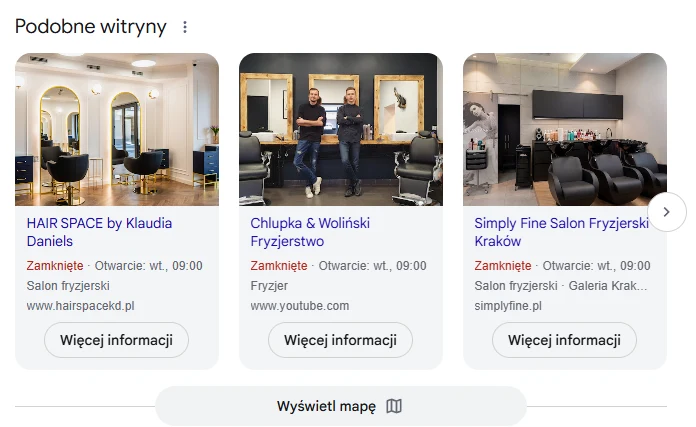
For each of the 15 queries, a block labelled “Podobne witryny” (Similar sites) sat under the local unit with the map (headed “Firmy”, Businesses, or “Miejsca”, Places). It is a carousel of businesses with a name, a category and whether the business is open now, in other words data from the Business Profile. Under each one is the website address and a “Więcej informacji” (More information) button, which leads straight to the business’s website, not to Maps.
The most interesting part is where those links lead when a business has no website of its own. In 9 of 15 queries at least one business in the carousel linked elsewhere: to Facebook, Instagram, YouTube, a Booksy profile, a garage listings site, a company data site and, in Kraków, to pages made with the Localo site builder. So the “website” field in the Business Profile decides where a customer from this block lands. If it leads to an industry platform, the customer will see your competitors there straight away.
15 local queries, 26 October 2026
AI points to: ZnanyLekarz
not own site: Facebook
not own site: Facebook, aleo.com, Booksy
not own site: Facebook, Google Sites, dobrymechanik.pl · AI points to: review platforms
AI points to: ZnanyLekarz
not own site: Instagram, Facebook · AI points to: Booksy
not own site: dobrymechanik.pl · AI points to: DobryMechanik.pl
not own site: Localo site builder (3 businesses), Google Sites · AI points to: usterka.pl
not own site: YouTube, Facebook, Booksy · AI points to: Booksy, Saloner
not own site: Facebook
not own site: inFakt
What does this test not tell you?
These are 15 queries from a single day, checked in two browsers with the location set to Częstochowa. Local results depend on where you search from and on the account, so yours may look different. The AI Overview appears with a delay, and for a few queries it was present in only one of the browsers, so treat these numbers as a picture, not a measurement. I also do not know whether “Podobne witryny” is exactly the supplier unit from the documentation, because Google does not label these blocks with the names used in its documentation. One thing is certain: the block appeared for all 15 queries and uses Business Profile data.
Who does AI recommend in local results?
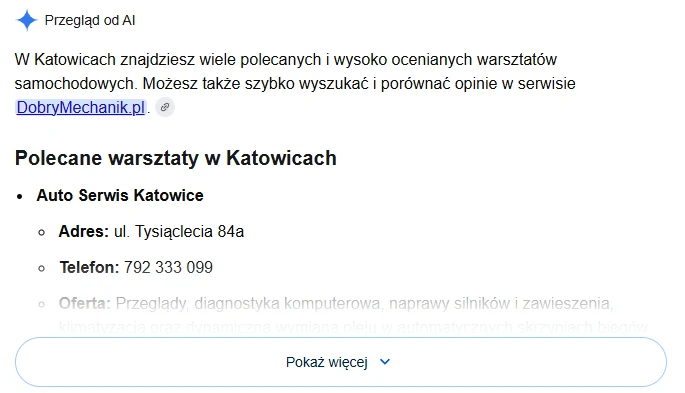
In 13 of 15 queries when signed in and in 11 when signed out, the page carried an AI Overview that named specific businesses, often with an address and sometimes with a phone number. The reasons, given in Polish, read like a summary of a Business Profile: “high customer ratings”, “a large number of positive reviews”, “fast diagnostics” (my translation). For the plumber in Katowice the overview gave the street, the phone number and the information that the business operates around the clock, at night too.
The second conclusion is less pleasant for small businesses. Roughly every second overview (7 of 13 signed in, 6 of 11 signed out) pointed to platforms, most of them Polish, in its very first sentences: ZnanyLekarz for dentists, Booksy for hairdressers, DobryMechanik.pl for mechanics, usterka.pl for the plumber in Kraków. A review platform is therefore a convenient source for AI and a direct competitor of your Business Profile.
What else is AI changing in local business search?
- More links in AI answers. On 15 October Google announced that AI Mode and AI Overviews will carry more links within the text of answers, and that it is testing a section with official websites. For a business this is a chance that AI will link to its website, provided it has one.
- Business panel as an AI Overview. In September a Business Profile panel labelled as an AI Overview was spotted in the US, with an option to continue the conversation in AI Mode. The description drew on, among other things, old information from the business’s website. I have not seen this in Poland.
- Ask Maps, or Gemini in Maps. In March Google launched a conversation with AI in Maps, in the US and India. It draws on reviews from more than 500 million people. I found no confirmation that it works in Poland, but the direction is clear.
The common denominator: reviews, categories, the business description and an up-to-date website are now the material from which AI assembles an answer about your trade in your city. How to build visibility in those answers is covered on my AI SEO page.
What to do with your Google Business Profile in the coming month?
Every point below rests on changes confirmed by Google or on what is visible in the results today. Most take a few minutes each.
01. Check who has access and who reads the notifications
You have 4 days to react to a suggested edit. If notifications go to the inbox of a former employee or an agency you no longer work with, Google will decide without you. Review the list of people with access to the profile.
02. Review pending edits and details from Google
A notification appears at the top of the profile editor when Google has updates, and changed text is marked in blue. Check the name, address, categories, phone number and opening hours.
03. Decide about automated calls from Google
In the “Advanced settings” of the profile you can turn off automated calls and text messages. Information given in such a call can end up in the profile, so it is better to know who in the business answers them.
04. Record a baseline for your reviews
Once a month, note the number of reviews and the average rating, ideally with a screenshot. If reviews disappear, you will have evidence for an appeal and you will know when it happened.
05. Generate a review link and QR code
“Read reviews” → “Get more reviews”. Put the link in thank-you emails and on invoices, and the QR code on the counter or in the service van. No discounts or gifts in return.
06. Remove contact details from the text of posts
A phone number, email address or social media handle in the text of a post puts the post at risk of removal. Offer contact through a button such as “Call now”, which uses the verified number from the profile.
07. Check the “website” field
It decides where your business links to in the “Podobne witryny” (Similar sites) block. If it points to Facebook or a profile on an industry platform, the customer lands there, not on your website.
08. Complete the description, categories and services
AI Overviews describe businesses in specifics: what they do, where they are, what stands out in their reviews. The fuller and more current the profile and the website, the lower the risk that AI describes you with outdated information.
09. Check what the customer sees
Type in 2–3 phrases your customers use to find you, such as “plumber + city”. See whether you are in the map pack, in “Podobne witryny” and in the AI Overview, and what AI writes about you.
10. Reply to reviews, positive ones too
It is still the simplest way to show future customers that the business is active. A calm reply to a critical review also shows how the business deals with problems.
My view
For years the Business Profile was, for many businesses, something somebody once set up and that runs by itself. These changes show that Google waits for the owner less and less. If you do not answer within 4 days, it decides for you. If reviews arrive in an odd rhythm, it removes them without asking. If you have no website, it links to your Facebook profile or your profile on an industry platform in the results.
What surprised me most in the analysis was how specific AI Overviews are for local queries. This is no longer general advice but a list of businesses with addresses and a reason taken from reviews. For a small business that is good news, because a place on that list is decided by things it can influence: reviews, a complete profile and a decent website. The bad news is that platforms with thousands of reviews have a head start here.
The Business Profile has stopped being a business card. It is now a data source for Maps, search results and AI all at once, and Google is increasingly willing to correct it without asking the owner.
FAQ: common questions
How long do I have to reject an edit to my Google Business Profile?
4 days from the notification. That is what Google Business Profile Help says. If you neither accept nor reject the suggestion in that time, Google may publish the change automatically when other public information, such as your website, supports it. Google may also apply some user suggestions without prior review if they are needed to comply with its policies.
Why have reviews disappeared from my Google Business Profile?
Most often because Google’s systems judged them suspicious. In autumn 2026 some owners received emails saying a sudden spike of spam reviews had been detected: Google removed them so they would not affect the rating and temporarily paused new reviews, usually for a few days. Reviews also disappear for policy violations, for example when they are collected in exchange for a discount. If you believe genuine reviews were removed, you can appeal.
Why is my review not showing on Google?
There are several possible reasons. The review may have been held back by spam filters, or the profile may have had new reviews temporarily paused. On top of that, since the end of September people who are not signed in see only a few reviews in Maps: in my test on 26 October it was 5 of 533, and the rest required signing in. The best check is to look for the review while signed in to the account it was posted from.
How do I generate a Google review link?
In your Business Profile select “Read reviews”, then “Get more reviews”. You can copy the link or download a QR code. The QR code can currently be generated only in a browser on a computer. Google suggests putting the link on receipts, in thank-you emails and at the end of a chat conversation.
Can I give a customer a discount for a Google review?
No. Google treats free or discounted products and services in exchange for reviews as fake engagement, which is strictly prohibited. The profile can be restricted for it: a block on new reviews, existing reviews unpublished for a time and a warning telling customers that fake reviews were removed.
Does Google call about a Business Profile, and is it a scam?
Google may call, text or send WhatsApp messages to the number in the profile to check that the details are up to date or to help customers, for example with a booking. It never asks for payment, a card number or a password, though. If someone demands money to keep your business on Google, it is not Google. You can turn automated calls off in the advanced settings of the profile.
Does a Google Business Profile affect what AI recommends?
In my test of 15 local queries an AI Overview appeared in 13 when signed in and in 11 when signed out, and named specific businesses, often with an address and a reason such as “high customer ratings”. Google does not describe exactly which data the overview uses, but reviews, categories and the business description clearly make their way into these answers.
Worth remembering
- You have 4 days from the notification to respond to a suggested edit to your profile. If you do not react, Google may publish it, and some edits are applied without prior review.
- Google removes reviews more often and sometimes pauses new ones. Reviews collected in exchange for a discount or a gift can lead to a block on new reviews, existing reviews being unpublished for a time and a warning visible to customers.
- A phone number, email address or social media handle typed into the text of a post may get the post removed. Contact belongs in buttons such as “Call now”.
- In 15 of 15 local queries I checked, in both browsers, a “Podobne witryny” (Similar sites) block sat under the map, with data from Business Profiles and links to business websites. In 9 of them at least one business linked to Facebook, a listings site or another platform instead of its own website.
- An AI Overview that named specific businesses appeared in 13 of 15 queries when signed in and in 11 when signed out, often with an address and a reason such as “high customer ratings”. Reviews and profile data now also work towards who AI recommends.
- Signed out, Google Maps showed only 5 of a salon’s 533 reviews in my test. The rest required signing in, so the newest reviews and the replies to them make the first impression.
Summary
Autumn 2026 brought two things at once to Google Business Profiles. On one side, more control in Google’s hands: 4 days to react, stricter review filters, new rules for posts and support. On the other, more places where profile data works for the business: the “Podobne witryny” (Similar sites) block in Polish results and AI Overviews that recommend specific businesses on the basis of reviews.
The simplest plan for now: make sure someone reads the notifications, collect reviews within the rules, clear contact details out of your posts and check where the “website” field leads. Tests such as photo verification or automatic opening hours are worth watching, but nothing needs changing because of them.
Sources and materials
Google help pages in their Polish version, Search Central documentation and industry reports. The test results and screenshots come from my own searches on 26 October 2026, in a signed-in and a signed-out browser:
- Pomoc Profilu Firmy – Aktualizacje Google w profilu Twojej firmy (Google Business Profile Help, Polish version: Google updates to your Business Profile, 4 days for suggestions)
- Pomoc Profilu Firmy – Automatyczne połączenia i SMS-y od Google (Google Business Profile Help, Polish version: automated calls and text messages from Google)
- Pomoc Profilu Firmy – Ograniczenia za fałszywe zaangażowanie (Google Business Profile Help, Polish version: restrictions for fake engagement)
- Pomoc Profilu Firmy – Link i kod QR do opinii (Google Business Profile Help, Polish version: review link and QR code)
- Pomoc Profilu Firmy – Zasady dotyczące zdjęć, filmów i treści wpisów (Google Business Profile Help, Polish version: policies for photos, videos and post content)
- Pomoc Profilu Firmy – Zasady dla firm zewnętrznych (Google Business Profile Help, Polish version: third-party policies, misuse of support channels)
- Pomoc Profilu Firmy – Zweryfikuj swoją firmę w Google (Google Business Profile Help, Polish version: verify your business on Google)
- Google Search Central – Regional differences in Search experience
- Google Search Central – Supplier unit in Google Search
- Google blog – AI Mode and AI Overviews updates (15 October 2026)
- Google blog – Ask Maps and Immersive Navigation (12 March 2026)
- Search Engine Roundtable – 4 days for suggested edits (23 September 2026)
- Search Engine Roundtable – emails about a sudden spike in spam reviews (22 September 2026)
- Search Engine Roundtable – signing in to see reviews in Maps (30 September 2026)
- Search Engine Roundtable – verification with a business photo (4 September 2026)
- Search Engine Roundtable – setting opening hours automatically (24 September 2026)
- Search Engine Roundtable – local knowledge panel as an AI Overview (17 September 2026)
- PPC Land – review link and QR code in Google documentation
Want someone to look after your Business Profile?
I will go through your profile, your reviews and how the business looks in Maps, in the “Podobne witryny” block and in AI Overviews, and then tell you what to fix first.
See local SEOHow this text was written
I will not pretend it was written entirely by hand, by candlelight. For the research, the proofreading and the code of this page I used a language model. It is a good tool for digging through documentation and catching the typos you no longer see on the third read of your own text. The English version was also prepared with a model, from my Polish original.
What the model did not do: it did not choose the topic, form the arguments or decide what this data means for your site. That stays with me, as does the last word on what goes into the text and what comes out of it.
Where the model helped
- digging through sources and organising data
- proofreading and the English version of the text
- code, page layout and infographics
What stays with me
- the choice of topic and what is worth saying about it
- the arguments, the reading of the data and the conclusions
- fact-checking and the decision on what goes into the text

Written by
Sebastian Baryś
Freelance SEO specialist · Częstochowa, Poland, and remote
I started when nobody had dreamt of Core Web Vitals and rankings were checked by hand. Today I work on making companies visible not only in Google, but wherever people ask questions. I write only about things I check myself in client projects.