Contents
Introduction
English version of an article first published in Polish on 12 November 2026. Read the Polish original.
ChatGPT may already have a profile of your business, even though nobody at the business created it. On 10 November 2026 OpenAI launched ChatGPT Business Hub, a dashboard where the owner can claim such a profile, correct the details and see how often ChatGPT mentions the business. A day later I tested it on my own business in Częstochowa, Poland.
In brief
- What it is: an OpenAI dashboard where a business claims its profile in ChatGPT, corrects its details and views statistics. The beta started on 10 November 2026.
- Poland: a profile of my business in Częstochowa already exists, but on 11 November my attempt to claim it ended with joining a waitlist.
- Verification: two stages. First you confirm your connection to the business (phone, email, domain or Shopify), then your identity with Persona, a third-party company.
- Statistics: mentions, website clicks and conversation topics from 28 days. You will not see what users actually asked.
- No guarantee: OpenAI states that claiming a profile does not earn a better place in ChatGPT answers.
- Terms: you accept them by continuing past the start screen. They include consent to phone calls from an AI assistant and a perpetual licence to basic business details.
I have two kinds of material and I keep them apart. The first is four screenshots from my account, taken on 11 November 2026. They show everything that can be seen in Poland today. The second is OpenAI's documents: the announcement, the product page, the help article, the policies and the terms. They describe the dashboard after a profile has been claimed, which I have not seen myself yet. For every piece of information I say where it comes from. When I get access, I will add screenshots from the dashboard.
You will learn:
- What ChatGPT Business Hub is and which three parts make up the "Businesses in ChatGPT" programme
- What the claiming path looks like on a real account in Poland, screen by screen
- Which verification methods OpenAI lists and what Persona is needed for
- What you can change in the profile and what stays on OpenAI's side
- How OpenAI counts a mention of a business and what the statistics will not show
- Which provisions of the terms are worth reading before you click
- What to prepare now so that verification goes through without corrections
What is ChatGPT Business Hub?
Business Hub is a dashboard for businesses built into ChatGPT. You open it from the side menu or at chatgpt.com/business-hub, after logging in to an ordinary account. It is part of a programme that OpenAI has named "Businesses in ChatGPT" and announced as a beta. According to OpenAI, 1.2 billion people use ChatGPT every week, and the programme is meant to help businesses reach them.
The programme has three parts:
Business profile
What the user sees after clicking a business in a ChatGPT answer. After verification it gets a blue badge.
Business Hub
The owner's dashboard: claiming the profile, editing details, the product feed and statistics.
Business Agent
The business's AI assistant, which the user talks to from the profile. US only for now.
The mechanism is simple. When ChatGPT names a business in an answer, the user can click and see its profile. That profile is created without the business being involved. Since 10 November the owner can come forward for it, go through verification and provide the details that ChatGPT should use when answering questions about the business.
OpenAI sets the limits straight away. Claiming a profile does not change whom ChatGPT recommends: recommendations and comparisons are to remain independent, and claiming guarantees neither a better place in the answer nor sales. The same goes for ads. I described them when ChatGPT Ads launched in Poland, and the same rule applies here: advertising does not influence the independent answers.
Does your business already have a profile in ChatGPT?
The easiest way to check is in the dashboard itself. The start screen has one field: a business search. On my account the interface is in Polish, except for one sentence at the bottom of the page. That sentence matters and I come back to it in the section on the terms.

I typed in the name of my business. ChatGPT found a profile and, after a click, offered to let me claim it. The profile has my business name and my address in Częstochowa. I did not create it and had never given OpenAI anything before.
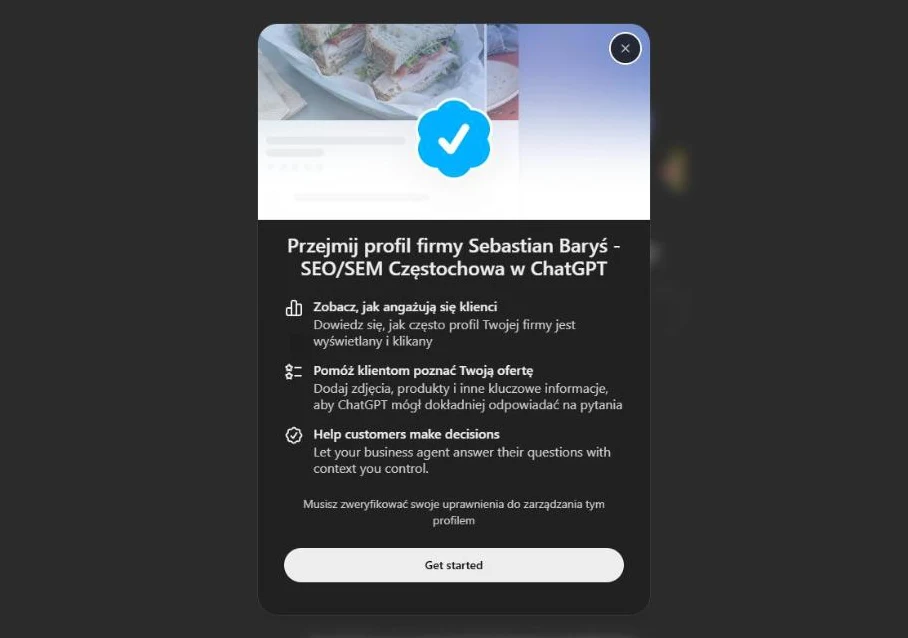
The dialog promises three things: statistics on profile views and clicks, the option to add photos, products and other information, and an agent that will answer customers based on context set by the business. Below that is a condition: you have to verify that you are authorised to manage the profile.
Where does OpenAI get the name and address from? It does not say. The profile policy contains only a sentence saying that profiles may include information from other sources. So I will not guess whether this is data from maps, from business directories or from the website. For the owner the conclusion is the same as with any AI system: ChatGPT takes business details from the web, so they have to be consistent on the web. I wrote about this at more length in the piece on entities in SEO.
What can you do in Poland today?
Not much. After clicking the button in the claim dialog I did not see a choice of verification method, only a waitlist message. In it OpenAI says that it is gradually opening access to more businesses and will send an email when it is possible to continue.

I joined. The next screen confirms it and has one button, which leads back to the chat. That is where the path in Poland ends today.

This result does not quite match OpenAI's documents, and it is good to know that before someone promises you "a profile in ChatGPT straight away". The announcement says that any eligible business from a place where ChatGPT is available can claim a profile. The product page adds that eligibility depends on industry, location and the outcome of verification, and that at the start claiming is available to businesses with a website. The help article goes further: local shops and restaurants can for now only claim an existing profile in the United States. None of these documents mentions a waitlist.
One business is one observation. I checked the profile of a service business with an address in Częstochowa. I do not know whether an online shop from Poland will see the same message or go straight to the choice of verification method. OpenAI told TechCrunch that it uses different verification methods for different types of businesses in different markets, so the paths may differ.
How does claiming a profile work according to OpenAI?
I did not get through the rest of the path, so I describe it on the basis of OpenAI's help article. The main thing that follows from it: there are two verifications. The first confirms that you are connected to the business. The second, that you are who you say you are. Only after the second does the dashboard let you publish anything.
The path from searching for the business to managing the profile
- 1
You search for the business in Business Hub
By name. You pick the right profile and confirm the ChatGPT account you will manage it from.
-
Poland, 11 November 2026: the waitlist starts here
I did not see steps 2–5. I describe them from OpenAI's help article.
- 2
You confirm your connection to the business
With one of the methods shown in the dashboard: business phone, business email, a TXT record on the domain or a Shopify store.
- 3
OpenAI reviews the request
The decision, or a request for more information, arrives by email. You can cancel the request while it is pending.
- 4
You verify your identity with Persona
You may need an identity document, the company's registration details and proof that you can represent it.
- 5
You manage the profile
You publish changes, connect a product feed and view statistics. The profile gets a blue badge.
How do you confirm your connection to the business?
The help article lists four methods and notes that the dashboard will show the ones available for a given business. So not every business will see all of them.
Business phone
A code by text message or automated call to the number shown in the dashboard.
Business email
A code sent to an address associated with the business.
Website domain
A TXT record added in the DNS settings. The change may take a while to become visible.
Shopify store
Logging in to the store and agreeing to connect it to ChatGPT.
For a business with its own domain, the TXT record seems to me the most reliable. It does not depend on which phone number or email address OpenAI has in its data, and access to DNS usually belongs only to the owner or their IT person. Anyone who has verified a domain in Google Search Console knows this method.
There are also three special cases. If you received an email inviting you to claim a profile, you open the personal link and log in with the address it was sent to. If you see "Contact support" next to the profile, the profile is locked and you have to ask support for access. If someone claimed the profile before you, the profile menu has an ownership dispute option, settled through verification with Persona. Neither claiming nor a dispute changes the profile's visibility in ChatGPT.
Why the identity verification with Persona?
Persona is a third-party company that specialises in identity checks. According to the help article it may ask for a government-issued identity document, the company's registration details and proof that you can represent it. The business name, address and registration or tax number should match the official registers. In Poland that means the data in CEIDG (the register of sole traders) or KRS (the National Court Register, for companies).
Without an approved Persona verification you cannot publish changes, connect a product feed, see statistics or create an agent. Submitting the documents does not unlock anything by itself. You have to wait for OpenAI's decision, which arrives by email. The help article does not say how long that takes.
A warning about new profiles. If you are creating a profile from scratch through Persona, OpenAI's approval publishes it immediately. There is no separate publishing step, and a published profile cannot be deleted afterwards. The help article advises continuing only when the business is ready for that.
When does the blue badge appear?
Here OpenAI contradicts itself. The product page says that a blue badge will appear on the profile to show that it has been claimed. The help article says something else: claiming alone does not give the badge, it appears only after the Persona verification is approved. I trust the help article more, because it describes the path step by step. In both versions the badge confirms only who manages the profile. The profile policy states that OpenAI does not check every piece of information a business provides.
What can you change in the profile?
According to the help article, after both verifications you can change the following in the profile:
- website address
- business description
- product or service category
- logo and cover image
- delivery policy
- returns policy
The help article also mentions other optional information, without listing it. The profile policy names more broadly what has to be truthful: the name, category, address or service area, hours, contact details, and products and services. I will not say whether each of these fields can be edited in the dashboard. I will see that once I have access.
A change is not published straight away. OpenAI reviews it, and then some time may pass before it reaches the profile and the answers. The help article adds a point worth remembering: ChatGPT may also use other sources when it answers questions about the business. So the profile is one of the voices, not the only one.
How does the product feed work?
Shops can connect a product feed with prices and availability. The options are a CSV file that follows OpenAI's specification, the URL of a file on your own server, or the Shopify catalogue. Products have to comply with OpenAI's commerce policies. Connecting a feed does not publish an agent and does not guarantee that ChatGPT will recommend your products.
Shopify has a privileged position here. The store connects to ChatGPT from the Shopify admin or from Business Hub, and product data flows through the Shopify catalogue. According to OpenAI, eligible products from Shopify merchants are already in ChatGPT. Shops on other platforms are left with the CSV file. Before you connect it, read the section on the terms, because a product feed brings additional obligations with it.
What do the statistics in Business Hub show?
For anyone who works on AI visibility, this is the most interesting part. Until now, how often ChatGPT mentions a business could only be inferred from third-party tools that put questions to it themselves. Here, for the first time, the numbers come from OpenAI. The "Insights" tab shows aggregate activity from the last 28 days in three metrics.
01. Mentions
How many times ChatGPT referred to the business. The definition depends on the type of business, more on that below.
02. Website clicks
How often users went from ChatGPT to the business's website.
03. Conversation topics
Common themes of the answers in which the business was mentioned or cited. OpenAI calls them "discovery topics".
What does OpenAI count as a mention?
There is a catch here that is easy to miss. The definition is different for an online business and for a local one.
Online business
A mention counts when ChatGPT refers to the business's website. The brand name alone in an answer is not enough.
Local business
A mention counts when ChatGPT shows a result for that location. Also when the user does not open the profile or visit the website.
For an online shop this means the statistics will show less than is actually happening. If ChatGPT recommends the brand by name but without referring to its website, it will not be in Business Hub. Anyone who measures brand visibility in AI with a third-party tool will therefore see different numbers from those in OpenAI's dashboard, and both can be true, because they count different things.
What will the statistics not show?
Users' questions. OpenAI repeats this in several places: businesses do not receive the content of conversations, including conversations with their own agent. Conversation topics are aggregate categories which, according to the help article, do not reveal individual questions and do not directly measure customer intent.
The data is also thresholded. A metric appears only when there are enough conversations. An empty field can mean that activity did not pass the threshold, that data is still being collected or that the report is temporarily unavailable. It does not have to mean zero. A small local business may therefore see an empty dashboard for a long time even though ChatGPT does mention it. We know the same mechanism from Google Search Console, where rare queries are hidden.
What is a Business Agent?
A Business Agent is the business's AI assistant, available from its profile. A user who saw the business in a ChatGPT answer can open the profile and start a separate conversation with the agent: ask about the differences between two products, about returns, about which variant fits their needs. The agent answers on the basis of information provided by the business and according to its guidelines. The conversation is labelled and kept separate from ordinary ChatGPT answers.
You cannot launch an agent in Poland. For now OpenAI makes it available to selected online shops and online service businesses in the United States that have a website and fall within the permitted industries. Business verification alone does not give the right to an agent. It is still worth knowing how it works, because OpenAI has announced expansion to more markets and categories.
Three things from the documents that change the picture:
- The agent does not sell anything. It will not take an order, book an appointment or check a delivery status. It explains the offer and points to the business's website.
- The business is responsible for the agent's answers. The terms say so plainly, including when the business neither prepared nor approved a given answer. OpenAI states that the agent can make mistakes and does not always follow instructions.
- The agent can be an ad destination. A business can sponsor it and direct ads from ChatGPT Ads to it. Such placements are labelled.
The agent policy is fairly restrictive, and that is a good thing. The agent has to say clearly that it is an AI representing the business. It may not pretend to be a human or an independent adviser. It is not allowed to apply pressure, create artificial urgency or repeat an offer after a refusal. It may not ask for health data, identity documents or login credentials, or give advice that requires professional qualifications.
How is it different from a Google Business Profile?
The comparison suggests itself and the trade press made it immediately. The similarity lies in the idea: the business profile exists before the owner takes an interest in it, and claiming it requires verification. There are more differences. I filled in the Business Hub column from OpenAI's documents, because I have not yet seen the dashboard after claiming.
The most important difference does not fit in the table. A Google Business Profile is what the customer sees on Maps, and what you enter in it largely ends up there. A profile in ChatGPT is one of the sources from which the model assembles an answer. OpenAI reserves the right to supplement and replace your details with others. So the control is smaller than the word "claim" suggests.
The Google Business Profile remains the foundation of local visibility. How to set it up and run it is covered in my guide to Google Business Profile, and how to get through verification in the part on Business Profile verification. Google is, for that matter, testing its own AI dashboard for businesses, which I wrote about in the piece on Google Business Home. Both companies are heading the same way: the owner is to supply verified data, and AI is to answer customers from it.
What do you accept by continuing?
At the bottom of the start screen there is one sentence in small print, in English: by continuing, you accept the "Businesses in ChatGPT Terms". The terms themselves confirm that you give consent simply by using the service. So joining the waitlist also happens on their conditions. I read the version of 9 November 2026 and picked six provisions that a business owner should know before clicking.
The profile exists regardless of you
Section 4.1: OpenAI may create, maintain and display a business profile whether or not you claim it or stop managing it. Claiming does not give exclusive control over the content. OpenAI may supplement, change or replace the details with information from other sources, and may also not display what you provide.
An AI assistant may call you
The same section: by using Business Hub you agree that OpenAI's AI assistant may call the business on behalf of users. The terms give an address where you can opt out. Call opt-out form.
You cannot take back the basic details
Section 4.2: the licence to basic business details provided for public display (name, address, contact, category, hours, website) is perpetual and irrevocable. The help article adds that a published profile cannot be deleted or hidden.
The statistics are confidential
Section 6: data from the statistics is OpenAI's confidential information. You may use it to measure and optimise your own presence. Without OpenAI's written consent you may not disclose it to anyone other than service providers acting on your behalf. An agency will see it, but a screenshot in a case study is a different matter.
You waive some claims
Section 10: you undertake not to pursue claims against OpenAI concerning the data you provided, or other content published on your websites before the agreement was concluded and during its term. The exception is a breach of the terms by OpenAI. The provision is described as irrevocable.
Shops: the product feed has its price
Section 3 applies only to businesses that connect a product feed. They undertake to allow OpenAI's crawlers and agents to access their websites and not to rely, against OpenAI, on text and data mining reservations in relation to their websites.
I am not a lawyer and I do not assess which of these provisions are enforceable against a Polish business. I summarise the text so that it is clear what to ask about. For a one-person service business that provides a name, address and phone number, most of them have little practical significance, because those details are public anyway. It looks different for a publisher or a shop with its own product descriptions and photos. There, the sections on claims and on text and data mining reservations touch what the business earns its money from, and they are worth showing to a lawyer before connecting a product feed.
There is also a point for agencies and freelancers. Since the statistics are confidential, a report for the client fits within the terms, but a public case study with a screenshot of the "Insights" tab requires OpenAI's written consent. That is why, once I have access, I will show what the dashboard looks like and be careful with the numbers.
What should you do now?
There is no reason to hurry, but a few things can be prepared before the waitlist starts moving.
01. Read the terms before you continue
Joining the waitlist also happens under the terms. If you run a shop or publish content, show sections 3 and 10 to a lawyer.
02. Search for your business and note what ChatGPT knows about it
Name, address, the directions button. If something is wrong, it is a sign that an outdated version of your business details is circulating online.
03. Decide who claims the profile
Ideally the owner, on their own ChatGPT account. The agency and employees are added later in the dashboard. I give the same advice for a Google Business Profile.
04. Prepare for verification
Access to the domain's DNS settings, a working email on the company domain, a phone that someone answers. For Persona: an identity document and registration details that match the business name and address.
05. Check whether OpenAI's crawlers can read your website
For an online business, a mention only counts when ChatGPT refers to its website. A blocked ChatGPT search crawler means empty statistics.
06. Tidy up your business details outside the dashboard
OpenAI states that it also uses other sources. The same name, address, phone number and offer on your website, in your Google Business Profile and in directories reduce the risk that ChatGPT shows an old version.
On the third point: the rules for giving an agency access are described in the part of my Google Business Profile series on access and roles in a Business Profile, and the same rules apply here. On the fifth: how to check and set access for OpenAI's crawlers is shown in the piece on AI bots in robots.txt.
My view
Business Hub matters more as a signal than as a tool. The tool does not work in Poland yet, and what OpenAI describes is modest: a few fields to edit, three metrics, an agent in the US only. The signal, on the other hand, is clear. For the first time OpenAI is telling businesses: give us your data directly and we will show you what we do with it.
What I am waiting for most is the statistics. Everything we know today about the presence of businesses in ChatGPT answers comes from tools that put questions to it from the outside and count the results. Numbers from OpenAI itself, even thresholded and narrowly defined, will be the first point of reference.
What I do not expect is that claiming a profile will change anything about whom ChatGPT recommends. OpenAI says so plainly and I have no reason not to believe it. Whether a business appears in answers is still decided by what is known about it from its website and from independent sources. The profile will only help make sure that the hours, address and offer are up to date.
And one more thing. Read the terms earlier than I did. Joining the waitlist is one click, and the conditions are longer and more serious than the look of the screen would suggest.
A profile in ChatGPT is not a second Google Business Profile. It is a form through which a business can add its own word before the model answers for it.
FAQ: common questions
What is ChatGPT Business Hub?
It is an OpenAI dashboard available in ChatGPT, launched in beta on 10 November 2026 as part of the "Businesses in ChatGPT" programme. A business can claim its profile there, correct its details after verification, add a product feed with prices and availability, and see aggregate statistics: mentions, website clicks and the topics of conversations in which it appears.
Does ChatGPT Business Hub work in Poland?
Partly. The dashboard opens on a Polish account and its interface is mostly in Polish, and the profile of my business in Częstochowa can be found in it. On 11 November 2026, however, the attempt to claim it ended with a waitlist message: OpenAI is gradually opening access to more businesses and will send an email when it is possible to continue. OpenAI gives no date.
Is claiming a business profile in ChatGPT paid?
The OpenAI materials I read do not mention any fee for claiming a profile. The help article notes that you do not need an advertising account or a ChatGPT Enterprise agreement. Ads in ChatGPT are a separate service and claiming a profile does not commit you to it.
Will claiming the profile improve my visibility in ChatGPT?
OpenAI says plainly that it gives no such guarantee. Claiming lets you manage the information you provide yourself, but ChatGPT still decides independently whom it recommends and whom it compares you with. The terms add that OpenAI does not guarantee any position, visibility, traffic or sales.
How does OpenAI verify a business in Business Hub?
In two stages. First you confirm your connection to the business with one of the methods shown in the dashboard: a code sent to the business phone, a code sent to the business email, a TXT record in the domain's DNS, or a connection to a Shopify store. Once the request is approved, you go through identity verification with Persona. Only after that can you publish changes, connect a product feed and see statistics.
Can a business profile be removed from ChatGPT?
Only an unpublished draft profile can be deleted. According to OpenAI's help article, support does not delete, unpublish or hide a published profile. The terms add that OpenAI may create and display a business profile regardless of whether anyone has claimed it.
Can an agency manage a business profile in ChatGPT?
Yes. The administrator who claimed the profile can add collaborators in Business Hub and give an agency access to the profile or the agent. Each person uses their own ChatGPT account. If the profile was claimed within a company ChatGPT workspace, invited people may need to belong to it.
What is a Business Agent in ChatGPT?
It is the business's AI assistant, which a user can talk to from its profile in ChatGPT. It answers questions about products and policies based on information provided by the business and points to its website. It does not take orders or bookings. For now only selected online shops and online service businesses in the US can launch one.
Worth remembering
- OpenAI is not consistent about the blue badge. The product page says it appears once the profile is claimed, while the help article says it appears only after the Persona verification is approved.
- OpenAI's help article says that local shops and restaurants can for now only claim an existing profile in the US, and it does not mention a waitlist. Even so, the profile of my business in Poland can be found and submitted for claiming.
- An empty field in the statistics does not mean zero. According to the help article it can mean that activity did not pass the reporting threshold or that data is still being collected.
- For an online business, a mention only counts when ChatGPT refers to its website. The brand name alone in an answer does not reach the statistics.
- A saved change to the profile does not have to reach answers straight away. OpenAI reviews changes before publication, and ChatGPT also uses other sources.
- Each brand is claimed separately, and claiming a brand does not cover its locations. There is no central management of multiple locations yet.
- A personal invitation to claim a profile cannot be passed on. The team and the agency are added by the administrator in the dashboard, each person on their own ChatGPT account.
- OpenAI's announcement points to the Business Agents policy for the list of business categories that can have an agent. On 11 November 2026 I did not find such a list there.
Summary
ChatGPT Business Hub is a dashboard where a business claims its profile in ChatGPT, corrects its details after two verifications and views aggregate statistics from 28 days. The beta started on 10 November 2026. A profile of my business in Częstochowa already exists in ChatGPT, but on 11 November my attempt to claim it ended with joining a waitlist.
Before you click, read the terms and prepare what verification requires: access to the domain, a business email and registration details that match the business name. The rest of the work is done outside the dashboard. ChatGPT assembles its answer about a business from many sources, so tidy data on your website and across the web will be useful regardless of when OpenAI opens access in Poland.
Sources and materials
OpenAI's documents as they stood on 11 November 2026 (in English), my own screenshots of Business Hub from the same day and TechCrunch's coverage:
- OpenAI – Introducing Businesses in ChatGPT (10 November 2026)
- OpenAI – Businesses in ChatGPT: Claim Your Business (product page with FAQ)
- OpenAI Help Center – Setting up your business on ChatGPT
- OpenAI – Businesses in ChatGPT Terms (terms, version of 9 November 2026)
- OpenAI – Businesses in ChatGPT (profile policy, version of 10 November 2026)
- OpenAI – Business Agents Policy (version of 10 November 2026)
- ChatGPT Business Hub (dashboard, login required)
- TechCrunch – OpenAI rolls out new business profiles (10 November 2026)
Want to know what ChatGPT says about your business?
I will check how your business looks in the answers of ChatGPT and other AI systems, where they get their data about it and what to fix before Business Hub opens in Poland.
See the AI SEO serviceHow this text was written
I will not pretend it was written entirely by hand, by candlelight. For the research, the proofreading and the code of this page I used a language model. It is a good tool for digging through documentation and catching the typos you no longer see on the third read of your own text. The English version was also prepared with a model, from my Polish original.
What the model did not do: it did not choose the topic, form the arguments or decide what this data means for your site. That stays with me, as does the last word on what goes into the text and what comes out of it.
Where the model helped
- digging through sources and organising data
- proofreading and the English version of the text
- code, page layout and infographics
What stays with me
- the choice of topic and what is worth saying about it
- the arguments, the reading of the data and the conclusions
- fact-checking and the decision on what goes into the text

Written by
Sebastian Baryś
Freelance SEO specialist · Częstochowa, Poland, and remote
I started when nobody had dreamt of Core Web Vitals and rankings were checked by hand. Today I work on making companies visible not only in Google, but wherever people ask questions. I write only about things I check myself in client projects.