Contents
Introduction
English version of an article first published in Polish on 6 November 2026. Read the Polish original.
Google is testing a new dashboard for small businesses: Google Business Home. It brings Google Business Profile, Merchant Center, YouTube and Google Ads into one place and puts AI based on Gemini models on top of it all. For now it is a closed beta for selected businesses from the US and the UK, but the direction is clear enough to be worth knowing before the dashboard reaches Poland.
In brief
- What it is: one Google dashboard with AI (Gemini models) for Google Business Profile, Merchant Center, YouTube and Google Ads.
- Who has access: a closed beta: only invited businesses from the US and the UK, with fewer than 10 locations.
- Poland: Google has given no date and no price, and the help centre exists only in English.
- The most interesting new feature: a comparison of reviews and views with similar businesses nearby.
- What to do today: put your business information in order in your Business Profile, on your website and on social media, because Google AI will write about your business from it.
I rely first of all on Google documentation. Google Business Home has its own help centre, and most of the facts here come from it. Where I use industry coverage, I say so directly. I mark separately what Google describes as a working feature and what it only announces, because that distinction is easily lost in the first write-ups. I covered the basics of working with a Business Profile in my Google Business Profile guide.
You will learn:
- What Google Business Home is and which Google tools it brings into one dashboard
- Who gets access today and what limits Google sets
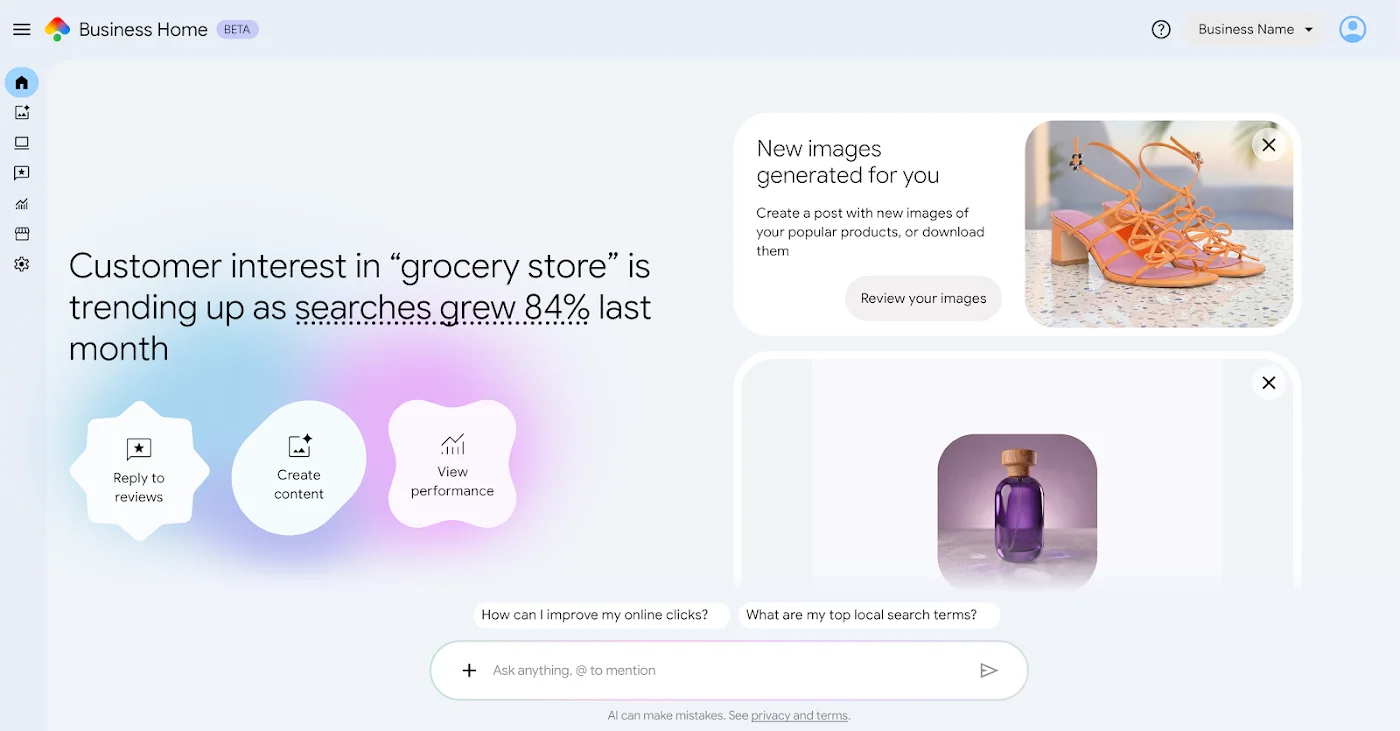
- What is inside: posts with a calendar, Creative lab, reviews, statistics and the Ask Advisor assistant
- Which features work in the beta and which Google has only announced so far
- Why the brand kit is more interesting for a small business than AI images
- What to prepare now, even though Google Business Home does not work in Poland yet
What is Google Business Home?
According to Google, it is meant to be a growth partner for a business, built on Gemini models, that connects the most important business tools. In practice it is one dashboard in which a business sees and handles what is scattered across four Google services today.
What goes into Google Business Home
Google Business Profile
details, reviews, photos, posts, messages
Merchant Center
products and traffic to the shop website
YouTube
videos and posts on the channel
Google Ads
selected campaign results
Google Business Home
posts, images, reviews, locations, statistics and an AI chat in one place
According to the help centre, Google Business Home does four things in the beta today: it helps create content with AI and photo tools, lets you manage locations (hours, reviews and the rest of the details), gives a view of the whole business with priority actions, and handles messages from customers, with AI replying. Messaging runs on RCS for Business, the business messaging standard used in the phone's text-messaging app.
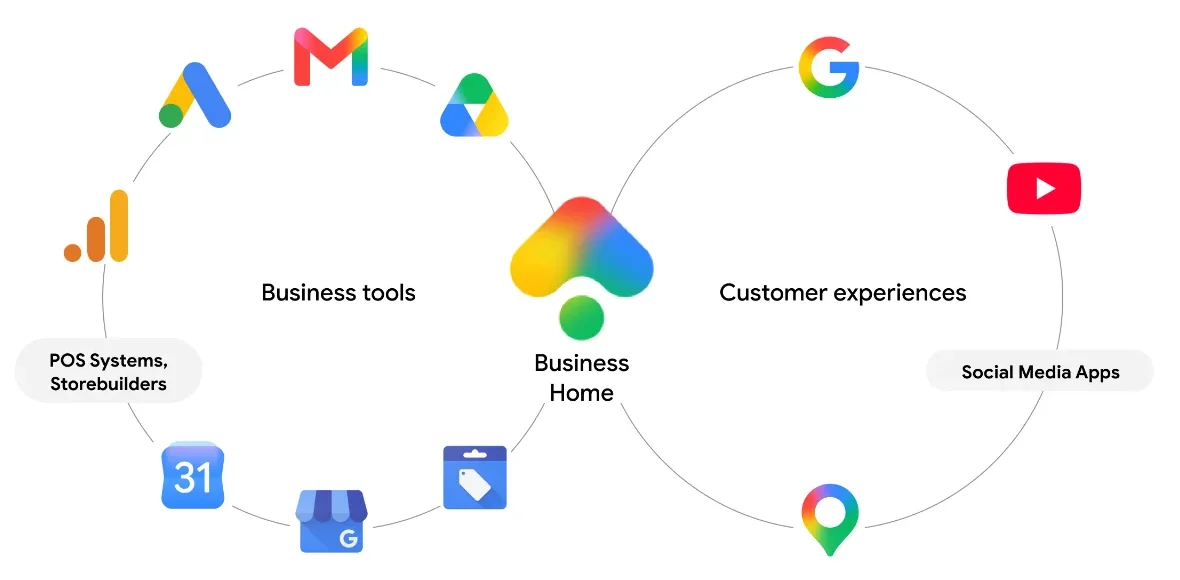
More interesting than the description is the graphic Google shows in the help centre. On the side of the business's tools it has not only Business Profile, Merchant Center and Google Ads, but also Gmail, Drive, Google Analytics, Calendar, and point-of-sale systems and store builders. Of that group, the help centre today mentions only Drive, from which Creative lab imports photos. Gmail, Analytics, Calendar and point-of-sale systems are not on the list of tools you can connect. Google does not announce this outright, but the graphic shows well where the dashboard is meant to go.
This is not Google's first separate dashboard for businesses. A single Business Profile is managed today mainly from Search and Maps, and Business Profile Manager serves above all businesses with many locations and agencies. Both places, however, cover only the Business Profile. Google Business Home is meant to cover a business's whole presence on Google: profile, shop, channel and ads. Barry Schwartz of Search Engine Roundtable, who described the dashboard on 22 October after receiving an invitation, pointed out that Google once had a separate portal for businesses and later dropped it.
Who can use Google Business Home?
Google help repeats the same statement in almost every article: Google Business Home is a closed beta, available only to selected business categories in the US and the UK. You cannot sign up for it. Selected businesses receive an invitation email with a “View your business home” button. According to Search Engine Roundtable, Google has been sending invitations gradually for several months, so 22 October is the date of the first wider write-up, not of the beta launch.
The requirements from Google help:
A business in the US or the UK
and only in selected categories, which Google does not list
A verified Business Profile
you are its owner or manager
Fewer than 10 locations
of the same business
One type of business
a restaurant and a shop on one account will not pass
One account each
YouTube, Google Ads and Merchant Center
Compliance with Google policies
in the connected tools too
The list makes it clear who the beta is for: a small business with one type of activity and a few sites. Interestingly, the threshold sits just under 10 locations, which is where, in an ordinary Business Profile, setting up a business group starts to make sense. I describe that in the part on access and roles in a Business Profile. One detail for the precise: in one article the help centre speaks of fewer than 10 locations, in another of a chain of up to 10 locations. Right at the threshold I would therefore not treat that number as exact.
If one Google account handles several different businesses, Google Business Home will show a business selection screen and then let you switch between them. The brand kit (something like a simplified brand book, I describe it below), the AI writing style and the connected data sources are separate for each business. None of the help articles mentions a price.
What is inside Google Business Home?
Below I have gathered the main parts of the dashboard, based on Google help and the screenshots published by Search Engine Roundtable. The names are given as they appear in the help centre.
Home
The most important changes, milestones reached and recommended actions to start the day.
Posts
Posts to the profile and YouTube at once, scheduling for a specific date, a calendar with suggestions.
Creative lab
A "shoot" in several styles from one product photo, variations, background change by prompt.
Reviews
Reviews from all locations, keyword search, filters, reporting.
Performance
Statistics for the profile, Ads, Merchant Center and YouTube, comparison with similar businesses.
Locations
Details, hours, photos and industry-specific features of each location.
Settings
Brand kit and connected tools, which you turn on and off with a toggle.
Ask Advisor
An AI chat that edits the profile, drafts replies and explains results.
How do posts and the calendar work?
You create a post once and choose where it should appear: on the Business Profile (in Maps and Search) and on the YouTube channel, if one is connected. You can add up to 10 photos in JPG, PNG or WEBP to a single post. Google recommends 1080 × 1080 px, and for a post on the profile the minimum is 250 × 250 px and 10 KB. You can publish the post straight away or schedule it for a specific day.
Instagram and other services are handled by the “Share on Social Media” button, but that shares a finished post, it does not publish directly from the dashboard. You can delete a published post in Google Business Home, but you have to edit it on the platform where it appeared.
The calendar is more interesting. It shows scheduled and published posts, and on free days it suggests further ones, based on seasonality, trends and the attributes of the business. There are also ready-made content ideas to choose from by goal, such as behind-the-scenes content or promotions and sales. Regulated industries, such as alcohol, medicines or financial services, can publish posts, but without content about regulated products.
What is Creative lab?
Creative lab is an image generator. It has three modes. “Photo shoot” turns one product photo into a series of shots in several styles: magazine, minimalist, macro, in motion or as the main photo of an offer. “Variations” shows the product from other angles, keeping the style, light and mood of the original. The third mode lets you improve a photo or change its background. You can also edit photos with prompts, for example asking for the background to be changed to a marble countertop, and Google Business Home itself suggests images based on praise from reviews or popular products. Such a suggestion can be published to the profile with one click.
Everything starts from your photo. Creative lab does not invent a product from scratch, it reworks what you give it. The help centre does not mention generation limits or labelling images as created by AI.

How are reviews handled?
The reviews tab shows three numbers at the top: the average rating across all locations, the number of reviews without a reply and the reviews from the last 28 days. Below there is a keyword search (Google gives delivery and refund as examples), filters by rating and reply status, and reporting of reviews that break the rules. From the same tab you open the assistant and ask it, for example, to show negative reviews without a reply or to summarise recent four-star reviews. How to reply to reviews without doing harm is something I show in the part on responding to reviews.
What can Ask Advisor do?
Ask Advisor is an AI chat through which you manage the business as if in conversation. According to Google help, it can:
- change details in the profile: attributes, brand kit, menu, locations, photos, action buttons and opening hours,
- find reviews and prepare a draft reply, which you approve before it is published,
- remove a background, crop a photo, suggest an idea for a post,
- read an uploaded file: a photo, a PDF, a Word document, an Excel sheet, a presentation, TXT or CSV,
- suggest an action on its own, for example changing the hours for a holiday with one click,
- answer questions about reports, settings and budgets in Google Ads.
You point to a specific location or Merchant Center account in the conversation with the “@” sign. I describe the terms of using the assistant below, in the part on risks.
What do the statuses of connected tools mean?
Google Business Home help has a separate article on the statuses of connected accounts and explains what the most common ones mean: a suspended profile, verification on hold, flags on reviews and business information that does not comply, and alongside that a suspension or payment block in Google Ads, a rejected product feed in Merchant Center or warnings on a YouTube channel. An important caveat: according to the help centre, each status is checked in the tool itself. Google does not say that Google Business Home collects them in one place, so this is a cheat sheet rather than a notification centre. What to do with a suspended profile is covered in the part on Business Profile verification and suspension.
Does Google Business Home reply to customers with AI?
Google lists AI messaging among the four pillars of the beta, and the statistics already include metrics for conversations handled by the AI agent without handing them over to the owner. The “Manage messaging” help section was empty at the beginning of November, however, so there are no details from Google Business Home. What is known is that, independently of Google Business Home, Google is expanding a pilot of AI agent messaging in Business Profile: a customer writes to the business from Search or Maps, and AI answers simple questions and passes harder ones to the owner. It works only for customers whose phone and carrier support RCS. The rest reach the business's phone by ordinary SMS.
What do the statistics in Google Business Home show?
For anyone working in local SEO, this is the most interesting part of the documentation. The “Performance” page gathers data from the profile, Merchant Center, Google Ads and YouTube, marks drops and spikes, and suggests what to do next to the metrics. With several locations you see the total by default, but each one can be filtered separately.
The new element is the comparison with competitors. Google defines it this way: “Similar businesses are nearby businesses with comparable ratings that appear for similar customer searches.” Against that background Google Business Home shows three things:
01. Review topics
What customers write about and what share of mentions is positive, neutral or negative. The same for similar businesses.
02. Search trends
Which queries in your area lead to businesses in your category and how their popularity changes.
03. Your views
How often customers saw your profile or products and how you do for those queries against similar businesses.
The ordinary profile statistics have no such comparisons. They show interactions, views and the search terms customers used to find you, but without a reference point. Until now that came mainly from paid third-party tools, which I describe in the part on Business Profile management tools(coming soon).
The rest of the profile metrics look familiar: calls, chat clicks, bookings, direction requests, website and menu clicks, unique users per day, a split between phone and computer and between Search and Maps. Two metrics for messaging are new: conversations the AI agent closed without handing over to the owner, and time saved. The second is an estimate in which Google assumes 5 minutes per conversation, so I would treat it as a sales argument, not a measurement.
Two caveats from the help centre are worth knowing straight away. The numbers may differ slightly from those in the source tools, for example in Google Ads, because the data syncs at a different rhythm. Only some metrics from Ads and Merchant Center reach Google Business Home, so it will not replace the reports in those tools.
What works in Google Business Home and what is only announced?
In the first write-ups it is easy to read that Google Business Home detects surges in demand and suggests seasonal promotions on its own. Google does write about this, but in the future tense: over time Google Business Home is meant to give holistic insights and the next step across all connected services. The example in the help centre is detecting a sudden surge in demand in real time and helping to publish a seasonal offer on social media. Today that is a plan, not a feature.
Works in the beta
- Posts to the profile and YouTube, scheduling, calendar
- Creative lab and brand kit
- Reviews with AI reply drafts
- Statistics with a comparison to similar businesses
- Ask Advisor
- A description of account statuses in connected tools
Announced
- Holistic insights from all tools at once
- Suggesting the next step
- Detecting a sudden surge in demand and helping with a seasonal offer on social media
- Gmail, Analytics, Calendar and point-of-sale systems are in Google's graphic, but not on the list of tools you can connect
Not stated by Google
- Price and payment model
- List of business categories in the beta
- Date for other countries, including Poland
- Whether the dashboard will replace managing from Search
- Content of the help section on messaging (empty)
How does Google Business Home differ from the Business Profile dashboard?
In Poland today you manage a Business Profile from Search, Maps or Business Profile Manager, and the other Google tools have separate dashboards. This is how the same task looks in both places:
The conclusion: Google Business Home changes nothing in the Business Profile from the customer's side. The profile in Maps looks the same, and ranking is still decided by relevance, distance and prominence. What changes is the owner's workshop: less switching between tools, more suggestions, AI for images and replies. For a business that does not look at its profile at all today, that can be a real difference. For someone who works on the profile regularly, the most valuable part will be the comparison with competitors.
Brand kit: Google wants to know your brand
The least showy part of Google Business Home is, in my view, the most important. The brand kit sits in the dashboard settings and is something like a simplified brand book: logo, colours, values, tone of voice and visual style. I use the name as it appears in the dashboard, since Google has no Polish version yet. Customers do not see it. Google Business Home uses it when it suggests post content and creates images, so that they fit the business.
One statement in the help centre is key: Google Business Home analyses the look and style of the business by itself, based on the website, social media profiles and connected accounts. You can correct the brand kit by hand, but the starting point is what Google finds about you on the web. If the website says one thing, the Facebook profile another and the Business Profile a third, the brand kit will start from chaos.
In the diagram below I have gathered where, according to Google help, the dashboard gets its knowledge about the business and what it then uses it for.
How does AI in Google Business Home know what to write about your business?
Sources
Business website
offer, look, style
Social media profiles
look and style of the brand
Connected accounts
Merchant Center, YouTube, Google Ads
Google Business Profile
categories, attributes, hours, products
Customer reviews
what they praise, what they complain about
What AI learns from them
Brand kit
logo, colours, values, tone, visual style
from the website, social media profiles and connected accounts
Business attributes
what it does and what it sells
from the profile and connected accounts
Praise and review topics
what customers appreciate
from reviews
What you get
Post suggestions
ideas and copy in the brand tone
Post calendar
by season, trends and business attributes
Creative lab images
also based on praise from reviews and popular products
Review reply drafts
for your approval
What happens when one source drifts apart
a fictional example: the bike repair shop “Szprycha” in Częstochowa, Poland
Website and Business Profile
“Repair shop in Częstochowa”
Old description on Facebook
“We serve the whole region”
AI gets two versions
and does not know which one is current
Post in May
“Visit our repair shop in Częstochowa”
Post in June
“We come to customers across the whole region”
Why does AI without a brand description write about a different business each time?
You can see this today, without Google Business Home. Take the bike repair shop “Szprycha” (Polish for “spoke”), which I use as an example in my series on Google Business Profile. The owner asks an AI chat for a post for the start of the season. The first time, AI writes to families with children, the second time to road cyclists. Once it opens with a formal greeting, once with a casual hello to fellow cyclists. And in the third post it adds, of its own accord, free collection of the bike from the customer's home, which the shop has never offered.
A language model does not know the business, so it fills in every missing piece of information with something plausible. Each post sounds fine on its own, but together they give a picture of several different businesses. The brand kit is Google's answer to that problem: before AI writes anything, it gets a description of the brand.
In fairness, consistency in itself is not a ranking factor. Nobody moves up in Maps for a nicely described tone of voice. It works indirectly: a customer who sees the same offer for the same people in the same place in the Business Profile, on the website and in reviews finds it easier to decide. Systems that assemble an answer about the business from the same sources have fewer conflicting signals. I wrote about how AI Overviews choose local businesses in AI in local SEO.
What to check before AI starts writing for the business?
Google's brand kit describes mainly look and tone. What the business actually does, AI will take from the profile, the website and reviews. The first box has the brand kit fields from Google help, the second has five things I suggest checking before you ask any AI for a post or a reply to a review. This review will be useful in Google Business Home, but also today, in every AI tool.
Brand kit fields in Google Business Home
according to Google help
- Logosquare, a JPG or PNG file
- Brand coloursthe same on the website, in the premises and on images
- Valueswhat customers praise you for and what you stick to
- Tone of voicea few words: e.g. matter-of-fact, warm, with humour
- Visual stylea description of photos that suit the business
A review before the first AI post
my suggestion
- 1Compare the description in your Business Profile with the text on your home pageDo both list the same services? If not, AI will take one this time and the other next time.
- 2List services typical of your industry that you do not provideAdd this list to every request for a post. AI readily fills in the offer with what is usual in the industry.
- 3Put prices and hours from several places side by sideWebsite, profile, Facebook. AI can repeat every discrepancy in the content.
- 4Read your last 20 reviewsNote what customers praise you for. Google Business Home suggests images based, among other things, on praise from reviews.
- 5Type your business name into GoogleSee what the AI Overview says about you. Outdated information points to a source that needs fixing.
The second point looks unnecessary, but in practice it saves the most corrections. A service the business does not provide, which AI added out of habit, is hard to catch later across dozens of posts.
One trap from Google help: the brand kit is tied to a specific Google Business Home and does not sync between people. If the business is managed by the owner and an agency, each can have a different brand kit. Agree on one version and keep it outside the dashboard, in a document all of you can access.
What to watch out for in Google Business Home?
AI can be wrong and Google says so outright
The Ask Advisor terms say that the assistant may sometimes show inaccurate or offensive results and that you have to assess them yourself before publishing. Google at least leaves replies to reviews for approval. With changes to the profile made by a prompt in the chat, I would check the result in Maps.
AI images and customer trust
Photos in a Business Profile are meant to show your place and your work, which I write about in the part on Business Profile photos. A different background behind a product is one thing, but a cake on a marble countertop that the patisserie does not have is a promise with nothing behind it. A customer who sees something different on site has a reason for a poor review. All the more so because image suggestions from Creative lab can be added to the profile with one click.
Conversations with the assistant do not stay in one place
According to the terms, conversations and remembered information may be shared between the different places where Ask Advisor works. Conversations, once disconnected from your Google account, may reach people who assess the quality of the answers. I would not paste customer data or contracts there.
One provider, one opinion about the business
The dashboard that writes posts, replies to customers, assesses results and suggests a Google Ads budget belongs to the company that earns from that budget. This is not an accusation, only a reason to verify spending recommendations outside the dashboard.
Will Google Business Home come to Poland?
That is not known. Google has given neither a date nor a list of further countries. At the beginning of November the Google Business Home help centre exists only in English, also after choosing the Polish language version. In Polish, the first mentions are for now appearing in industry discussion groups.
I am not going to guess when the dashboard will reach Poland. Google features for businesses usually start in the US and reach Europe after varying amounts of time, and some never arrive. One thing is certain: the things Google Business Home rests on, that is a complete profile, consistent business information, your own photos and reviews with replies, work in your favour today, in Maps and in AI Overviews. There is no need to wait for anything to deal with them.
What to do right now, before Google Business Home reaches Poland?
Every point below makes sense even if Google Business Home never reaches Poland.
01. Sort out who has access to what
Google Business Home requires the owner or manager role on the profile, and for publishing on YouTube also on the channel. If the profile, the channel and the Google Ads account belong to three different people, connecting them later will be awkward.
02. Check that your business information is the same everywhere
Google will build the brand kit from your website, social media profiles and connected accounts. Name, service area, offer and hours should match in each of these places.
03. Write down a simplified brand book for your business
Logo, colours, values, tone and photo style in one document, and next to it a list of services you do not provide. It will be useful in every AI tool, not only in Google Business Home.
04. Take your own photos of products and services
Creative lab works on your photo. From a good shot AI will make variations, from a bad one it will make nothing sensible.
05. Reply to reviews now
In the Google Business Home beta, review topics and their sentiment are compared with similar businesses. It is better if your reviews show replies and resolved problems.
06. Keep a steady rhythm of posts
The calendar in Google Business Home suggests posts by season and trends. You can have a plan of seasonal posts today, in an ordinary spreadsheet.
My view
Google Business Home shows how Google sees the future of a small business inside its services. The owner is not supposed to switch between the Business Profile, the channel, the ad account and the shop, but to talk to an assistant that knows all four. For a business with no time or people for marketing, that is convenient. For Google it is doubly convenient, because in one dashboard it is easier to show that it is time to raise the budget.
What I am waiting for most is not AI images but the comparison with similar businesses. Review topics with the share of positive and negative mentions, set against local competitors, are data you pay for today in third-party tools or collect by hand. If Google gives them away for free, the conversation with a client about what to improve in customer service will change.
I see no reason to rush, though. Nobody in Poland has access today, so nobody gains an advantage from the dashboard itself. The advantage belongs to businesses that already have their data in order, their own photos and a written brand description. Google Business Home will only show that faster.
AI in Google Business Home will write as well as you describe your business to it. You can prepare that description today, without an invitation from Google.
FAQ: common questions
What is Google Business Home?
It is a new Google dashboard for businesses, tested in a closed beta. It brings Google Business Profile, Merchant Center, YouTube and Google Ads into one place. Google describes it as a growth partner for a business, built on Gemini models. Inside there are, among other things, posts with a calendar, image generation in Creative lab, reviews, statistics with a comparison to similar businesses and an AI assistant called Ask Advisor.
Does Google Business Home work in Poland?
No. According to Google help, Business Home is a closed beta available only to selected business categories in the US and the UK. Google has not given a date or a list of further countries. At the beginning of November 2026 the Google Business Home help centre exists only in English.
Is Google Business Home paid?
That is not known. None of the help articles about Google Business Home mentions a price or fees. It is also not known whether the service will remain free after the beta.
Will Google Business Home replace Google Business Profile?
It does not replace the profile itself. The Business Profile still appears in Maps and Search, and Google Business Home is the place from which you manage it, together with other Google tools. Some things you still do outside it: you edit a published post on the platform where it appeared, and you fix account problems in the tool concerned.
How do I get access to Google Business Home?
For now only by invitation. Google sends an email to selected businesses from the US and the UK, and access opens with the "View your business home" button. The requirements include a verified profile, fewer than 10 locations of the same business and one type of business on the account.
What is Ask Advisor in Google Business Home?
It is a chat with an AI assistant built into Google Business Home. You can ask it to change opening hours, reply to a review, edit a photo or summarise results, including results from Google Ads. The assistant only drafts a reply to a review, you publish it yourself. Google states that AI results may be inaccurate.
Do customers see the brand kit from Google Business Home?
No. According to Google help, the brand kit is not shown to customers. Google Business Home uses it to suggest post content and images that match the brand: logo, colours, values, tone of voice and visual style.
Worth remembering
- The location limit is not stated consistently in Google help: one article says fewer than 10, another says up to 10. Right at the threshold, do not count on the exact number.
- Google describes detecting sudden surges in demand and suggesting the next step across all tools as a plan, not as a beta feature.
- The help section on AI messaging exists, but at the beginning of November 2026 it was empty. How exactly the dashboard replies to customers is not known yet.
- The time saved shown in the statistics is an estimate: Google counts 5 minutes for every conversation handled by the AI agent.
- Only some metrics from Google Ads and Merchant Center reach the dashboard, and the numbers may differ from those in the source tools.
- The brand kit does not sync between people. The owner and the agency can have different versions, so keep one outside the dashboard.
- You can delete a published post in the dashboard, but you can edit it only on the platform where it appeared.
- Creative lab does not invent a product from scratch, but it can add a scene that does not exist in your premises, for example guests at a table.
Summary
Google Business Home is a dashboard in which a small business is meant to handle its Business Profile, Merchant Center, YouTube and Google Ads at once, with the help of AI based on Gemini models. For now it runs as a closed beta in the US and the UK, for businesses with fewer than 10 locations and one type of activity. Inside there are posts with a calendar, Creative lab, review handling, statistics with a comparison to similar businesses and the Ask Advisor assistant.
Part of what circulates in the write-ups is announcements, and Google is silent about a price and a date for Poland. One lesson from Google Business Home is worth taking now: AI works on the business information it finds on the web. Put your profile, your website and your brand description in order, and you will benefit regardless of when the dashboard reaches Poland.
Sources and materials
Google Business Home help articles (as of 4 November 2026, in English only), Google Business Profile help and Search Engine Roundtable coverage:
- Business Home Help – About the Business Home beta
- Business Home Help – Manage your Business Profiles in Business Home
- Business Home Help – Create & manage posts in Business Home
- Business Home Help – Create & customize content with Creative lab
- Business Home Help – Manage your brand kit
- Business Home Help – Understand your business performance & insights
- Business Home Help – Manage customer reviews in Business Home
- Business Home Help – Status of connected tools
- Business Home Help – About Ask Advisor in Business Home
- Business Home Help – Ask Advisor Terms of Use & Policies
- Pomoc Profilu Firmy – Statystyki skuteczności profilu (Google Business Profile Help in Polish: profile performance statistics)
- Search Engine Roundtable – Google Business Home (22 October 2026)
- Search Engine Roundtable – AI agent messaging in Business Profile (29 October 2026)
Want to get your business ready for AI on Google?
I will check whether your business information matches in your Business Profile, on your website and elsewhere on the web, and help you write a brand description you can use in every AI tool.
See local SEOHow this text was written
I will not pretend it was written entirely by hand, by candlelight. For the research, the proofreading and the code of this page I used a language model. It is a good tool for digging through documentation and catching the typos you no longer see on the third read of your own text. The English version was also prepared with a model, from my Polish original.
What the model did not do: it did not choose the topic, form the arguments or decide what this data means for your site. That stays with me, as does the last word on what goes into the text and what comes out of it.
Where the model helped
- digging through sources and organising data
- proofreading and the English version of the text
- code, page layout and infographics
What stays with me
- the choice of topic and what is worth saying about it
- the arguments, the reading of the data and the conclusions
- fact-checking and the decision on what goes into the text

Written by
Sebastian Baryś
Freelance SEO specialist · Częstochowa, Poland, and remote
I started when nobody had dreamt of Core Web Vitals and rankings were checked by hand. Today I work on making companies visible not only in Google, but wherever people ask questions. I write only about things I check myself in client projects.