Contents
Introduction
English version of an article first published in Polish on 2 November 2026. Read the Polish original.
You create a Google Business Profile for free at business.google.com/add, and filling in the form takes a moment. Then comes verification, which according to Google takes up to 5 working days. Harder than the clicking are the decisions along the way: which account, name, category and address you create the profile with.
Most of the problems businesses bring to me started right at setup: a profile on a former employee's private account, a name with the city added, a virtual office instead of a real address. That is why at each step I show not only what to click, but also which decision you are making and why it is hard to reverse later.
This is the first part of a series on Google Business Profile. I work in Poland, so the screenshots show the Polish interface and the examples are Polish; the rules come from Google's own help pages. How to rank a finished profile is covered in my guide to Google Business Profile SEO, and what to do about critical reviews in the part on how to remove a Google review(coming soon).
What you will learn:
- Whether a Google Business Profile costs anything and what you actually pay for
- Which Google account to create the profile on, so you are not fighting for access a year from now
- How to go through the setup step by step and which decision you make at each stage
- How to answer the business type question, which determines the risk of the profile being suspended
- How to set a service area and hide your address if you travel to customers
- What to fill in during the first week after verification
- Which setup mistakes to avoid, because they come back months later
Does a Google Business Profile cost anything?
No. Google's help says it plainly: "With a Business Profile on Google, you can manage how your business shows up on Maps and Search at no charge." Creating the profile, verification, editing your details, replying to reviews and the performance statistics are all free.
Two things that are often confused with it can cost money. The first is the services of an agency or freelancer who sets up and runs the profile for the business. The second is Google Ads, which can also appear in Google Maps. If someone calls "from Google" and demands a fee for keeping the profile, it is a scam.
There is, however, a condition that hardly anyone mentions. According to Google, a Business Profile can only be created by businesses whose staff have in-person contact with customers. An online shop with no collection point, or a business that works entirely remotely, cannot create a profile. Google points such businesses to Google Ads.
What to prepare before creating a Google Business Profile?
Before you click anything, settle two things: which account you are creating the profile on, and whether your business is already in Google Maps.
A Google account that belongs to the business
Ideally a separate account on a company address that the owner has access to. Not an employee's private Gmail and not the agency's account. You can add the agency later as a manager.
A check whether a profile already exists
Type the business name and town into Google Maps. If there is a profile, you take it over with "Claim this business" rather than creating a second one.
Also prepare the details you will enter in the form: the business name exactly as on your signage and invoices, the address of your premises or a list of the towns where you work, a phone number, your website address and opening hours. It helps to have a few photos to hand as well: the logo, the interior or the team at work.
How to create a Google Business Profile step by step?
At each step I mark the decision that is hard to get rid of later. Google does change the screens themselves, but these decisions stay the same.
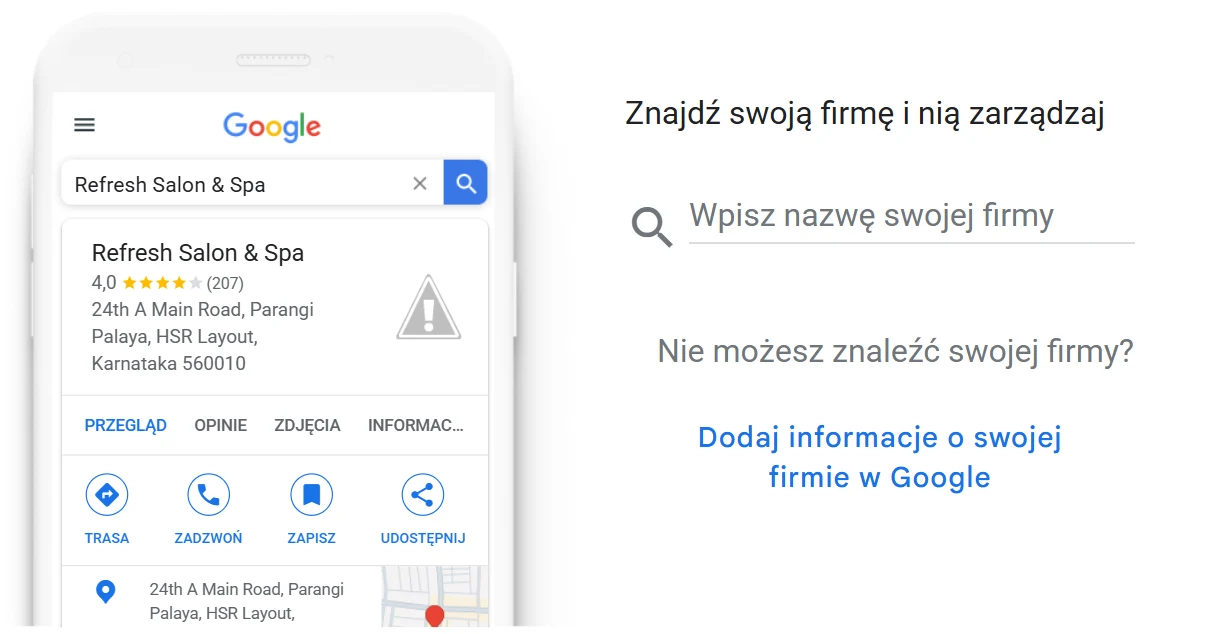
When you open business.google.com/add, Google first makes you search for the business. That is a good moment for step 1, because if your profile already exists, you will see it straight away. You only create a new profile through the link below the search field, the one for adding your business to Google.
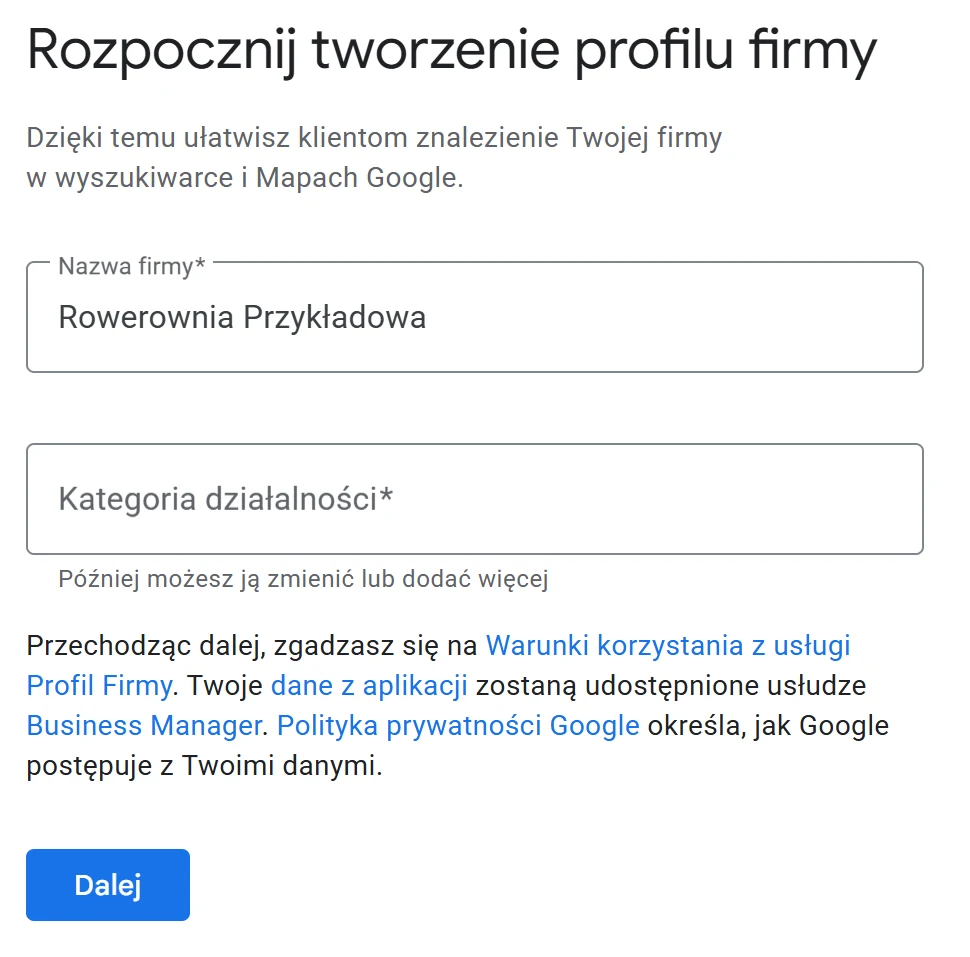
The next screen collects the name and the category together. Under the category field Google notes that you can change it or add more later, and next to the "Next" button it reminds you that by continuing you accept the Business Profile terms of service.
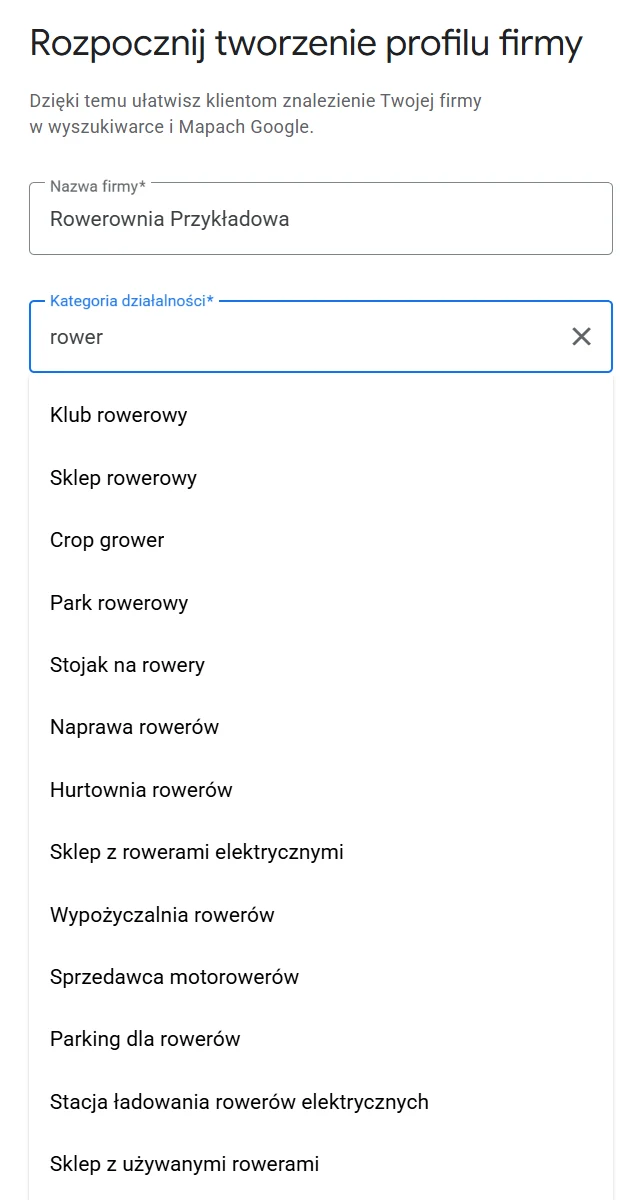
You choose the category from a list of suggestions; you do not type your own. After typing the word "rower" (Polish for "bicycle"), Google suggests a dozen or so categories, from "Sklep rowerowy" (bicycle shop) to "Naprawa rowerów" (bicycle repair) and "Wypożyczalnia rowerów" (bicycle hire). Among them you also get untranslated or completely unrelated items, such as "Crop grower". So read the list to the end and pick the category that most precisely describes what customers pay you for.
Creating a Google Business Profile: 8 steps
- 1
Check whether the business is already in Google Maps
Type the business name and town into Google Maps. A customer may have added the profile, or Google may have created it from data on the web.
Decision: If a profile exists, you take it over with "Claim this business" instead of creating a second one.
- 2
Sign in to the right account
Go to business.google.com/add and click the option to add your business to Google.
Decision: The account you create the profile on becomes its first owner. Ideally it belongs to the business.
- 3
Enter the business name
The one you use on your signage, invoices and website.
Decision: No keywords and no city. Changing the name after verification can trigger a new review of the profile.
- 4
Choose the primary category
Start typing what you do and pick the most specific category from the list.
Decision: The primary category strongly affects which searches you show up for. You can add additional ones later.
- 5
State where you serve customers
Premises that customers come to, visits to customers, or both.
Decision: This answer decides whether the address is visible and how Google verifies the business.
- 6
Give an address or a service area
The address of your premises, or up to 20 towns or postcodes where you work.
Decision: A virtual office and a PO box do not qualify. If you travel to customers, you hide your home address.
- 7
Add a phone number and website
A number that someone actually answers, and your website address if you have one.
Decision: The phone may be used for verification and for contact from Google, so give a number that belongs to the business.
- 8
Verify the profile
Google picks the method itself: phone or text message, email, video or a postcard.
Decision: Until it is verified, the profile does not work fully. Do not change the name, address or category in the meantime.
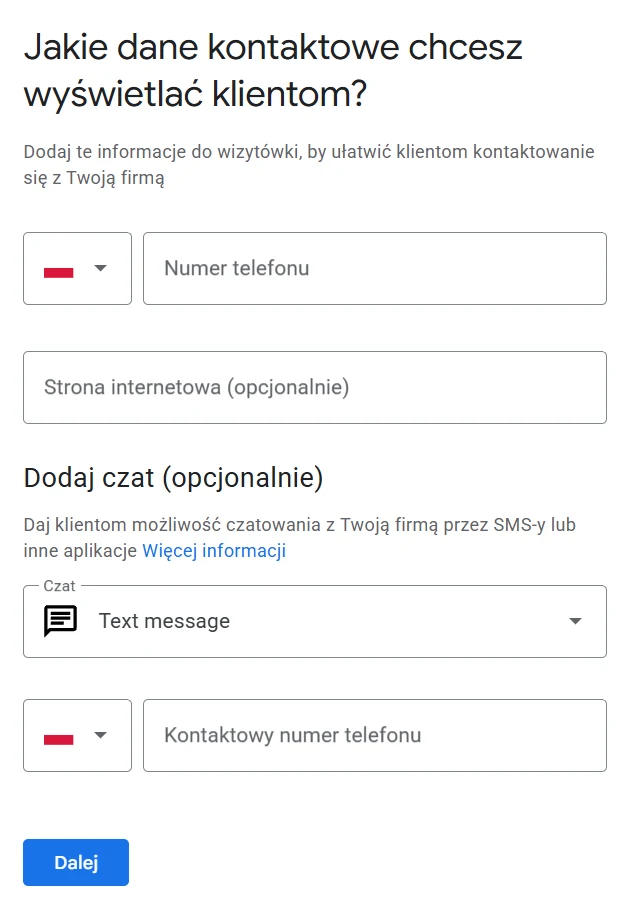
On the contact details screen, only the phone number has no "optional" label. The website and chat by text message are voluntary, but it is worth giving the website straight away.
If the business already has a profile that someone has verified, for example a former employee or an agency, you cannot claim it. Instead you ask the current owner to grant you access. How to do that, and what to do when nobody replies, I will describe in the part on access and roles in a profile.
Premises, visits to customers or both?
During setup Google first asks a short question: do you want to add a location customers can visit, such as a shop or an office. Answering "Yes" leads to the address, "No" straight to the service area.
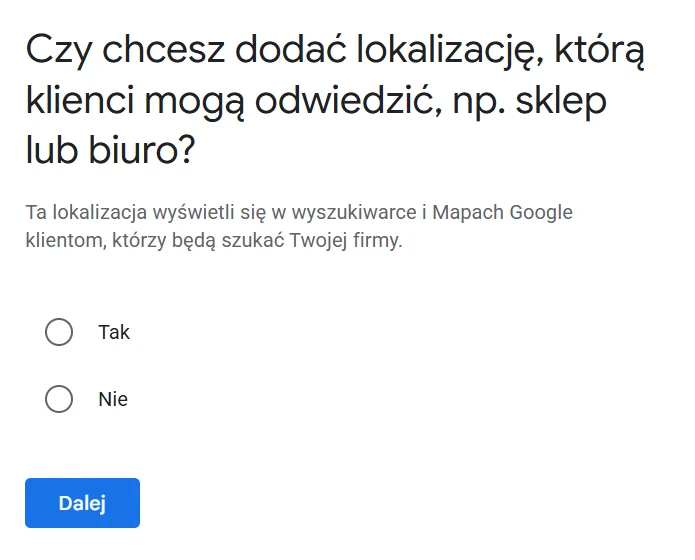
A broader version of this question comes back later. Since February 2026 the verification flow has included a question about what best describes your business, with five answers. According to Search Engine Roundtable's report, the answer you choose strongly affects whether the profile complies with the guidelines and how high the risk of a later suspension is.
Premises that customers come to, e.g. a shop, restaurant or practice
For a business with a physical location. The address is visible in the profile.
Premises, plus visits to customers
For a hybrid business. You give both an address and a service area. The premises must have signage and be staffed.
Visits to customers only, with no staffed premises
For a service-area business. You hide the address and set a service area.
An unstaffed facility, e.g. a cash machine or a charging point
For the exceptions to the in-person service rule. Requires an available customer service contact.
Online only
For no one who wants a profile. An online-only business does not qualify for a Business Profile.
The rule is simple: answer in line with what the person verifying you will see. If customers do not come to your address, do not select premises. If you sell online but also have a shop or travel to customers, do not select "online only", because that practically rules the profile out.
How to set a service area and hide your address?
If you travel to customers and do not receive them at your address, for example you work from home as a plumber or an electrician, Google requires you to remove the address from the profile. Instead you set a service area:
Up to 20 areas
Towns, postcodes or other areas where you really work.
About 2 hours' drive
That is how far from your base the boundaries of the area should reach. In some industries Google allows more.
No radius
You cannot set the area as a circle around your base. You choose specific places.
In the form the service area is described as optional, and under the field Google reminds you that you can change it later. Add it straight away all the same, because a business with no address and no service area has nothing to anchor it in Google Maps.
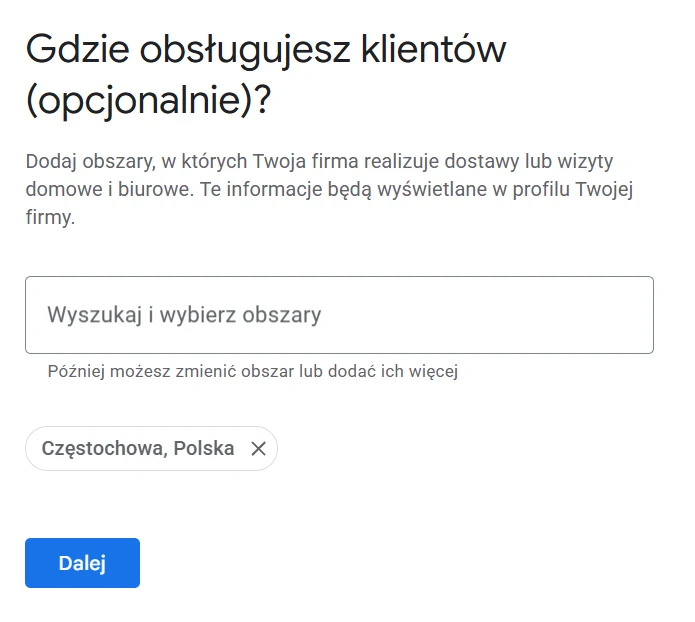
A business that has premises with signage and also travels to customers is, in Google's terms, a hybrid business. It gives both an address and a service area. Changes to the service area may take up to 2 days to appear in the profile.
How to get through Google Business Profile verification?
At the end of setup Google asks you to verify. There are several methods: phone or text message, email, a live video call and a postcard. You do not choose them yourself. Google's help says the methods are determined automatically and cannot be changed.
The review of your details takes up to 5 working days. The postcard with the code usually arrives within 14 days, and the code is valid for 30 days. Until you are verified, do not change the name, address or category, because any such change can lengthen the review. Which verification methods work in Poland today is covered in my post on the changes to Google Business Profile in 2026. Video verification, suspensions and contacting Google will get a separate part of the series.
What to fill in during the first week after verification?
A verified profile with only a name and an address is just a skeleton. This is the list I give clients for the first week:
Day 1. Opening hours
Regular hours and, straight away, holiday hours. A customer who arrives at a locked door usually leaves the worst reviews.
Day 2. Services or products
A list of what you really do, named the way customers talk about it. This helps Google match the profile to specific searches.
Day 3. Business description
Up to 750 characters: what you do, where and for whom. No links and no string of keywords.
Day 4. Photos
Logo, cover photo, the interior or the team at work, a few completed jobs. Real ones, not stock.
Day 5. Website link with UTM tagging
Add UTM parameters to the website address, e.g. utm_source=google and utm_medium=organic. In analytics you can then tell traffic from the profile apart from the rest of Google results.
Day 6. First reviews
Generate a review link and send it to a few regular customers. No rewards in return, because Google treats that as fake engagement.
Day 7. Access to the profile
Add a second person from the business as an owner or manager. When the only person with access leaves, recovering the profile takes a long time.
Additional categories, the description and the name are covered in more detail in the part on categories, and photos in a separate part of the series.
Which setup mistakes come back later?
These mistakes do not hurt on the day you create the profile. They surface months later, usually at the worst moment: when the profile is suspended, an employee leaves or you change agency.
01. A name stuffed with keywords
"Hydraulik Częstochowa 24h Kowalski" (Plumber Częstochowa 24h Kowalski) instead of "Kowalski Instalacje". Google says plainly that unnecessary information in the name can end in a suspended profile, and competitors are happy to report names like that.
02. A profile on an employee's private account
The most common problem businesses come to me with: the profile was created by an employee or an agency, and after they part ways nobody in the business has access to it.
03. A virtual office or a "for now" address
An address at a virtual office, a PO box or a coworking space with no signage does not qualify. Video verification shows this quickly, and the profile can be thrown out months later.
04. A second profile instead of taking over the first
When the business already has a profile created by someone else, a new one becomes a duplicate. Two profiles for the same business split the reviews and confuse Google.
05. A primary category that is too general
"Construction company" instead of "Roofing contractor", "Shop" instead of "Bicycle shop". A general category means showing up for general searches, where competition is strongest.
06. The wrong answer to the business type question
Selecting premises that customers do not visit, or the "online only" option because the business also sells on the internet. A mismatch between the answer and reality comes out during verification.
My view
Creating a profile looks like a formality, so businesses often hand it to someone on the side: an employee, a family member, the company that built the website. The form really does take a moment. The trouble is that the decisions made in that moment stay with the business for years, and the most expensive of them is the account the profile was created on.
If I had to give one piece of advice, it would be this: whoever creates the profile, its owner should be the business. An agency, freelancer or employee should have manager access, which can be removed with one click. Everything else, from categories to photos, you can fix later. Lost access is not so easy to get back.
One more thing, because my clients hear it regularly. Someone calls, introduces themselves as a Google employee and says the profile is expiring or will be blocked unless the business pays. It is a plain scam. A profile does not expire, and keeping it costs nothing. Google says plainly that it never asks for payment, a card number or a password. Do not give any details and do not get drawn into a conversation, just hang up.
You create a profile once. The account, name and address from that day stay with the business for years, so they are worth a few extra minutes.
FAQ: the most common questions
Does a Google Business Profile cost anything?
No. Google states plainly that a Business Profile lets you manage how your business shows up on Maps and Search at no charge. Only additional services are paid: an agency's help with running the profile, or Google Ads.
Can I create a Google Business Profile without a registered business?
Google's guidelines say nothing about an entry in a business register (in Poland: CEIDG or KRS). What they do require is a real business whose staff deal with customers in person, at its premises or at the customer's location. In practice, verification means showing that the business really operates, so without real business activity it is hard to pass.
Do I need a website to create a profile?
No. The website field is optional. It is still worth having one, because the profile and the website confirm each other's business details, and the link takes customers to a place where you can show your full offer.
How long before the profile appears on Google?
Once created, the profile has to be verified. Google says the review of your details can take up to 5 working days. With postcard verification, the card with the code usually arrives within 14 days, and the code is valid for 30 days.
What should I do if a profile for my business already exists?
Do not create a new one. If the profile is not verified, find it in Google Maps and choose "Claim this business". If it has been verified by someone else, for example a former employee or an agency, request owner access.
Can one business have two Google Business Profiles?
One location means one profile. Google prohibits creating more than one page per location, whether in one account or several. The exceptions are branches and departments that operate as separate entities, with a different name and category, and further locations of the business.
Can I create a profile if I work from home?
Yes, if you serve customers in person, for example by travelling to them. In that case you state that the business serves a defined area, hide your home address and list the towns where you work.
Worth remembering
- A Google Business Profile is free. At most you pay for an agency's help or for Google Ads, but those are separate services.
- Only a business whose staff deal with customers in person can have a profile. An online-only business does not qualify.
- Create the profile on an account that belongs to the business, not on the private account of an employee or an agency.
- The name in the profile should match your signage or website. Added keywords and a city name can end in a suspended profile.
- If you travel to customers, hide your address and set a service area: up to 20 towns or postcodes, roughly within 2 hours' drive of your base.
- Google chooses the verification method. The review of your details takes up to 5 working days, and the code on the postcard is valid for 30 days.
- One location means one profile. Before you create a new one, check Google Maps to see whether your business is already there.
Summary
A Google Business Profile is free and quick to create. What counts is what you settle along the way: an account that belongs to the business, the name as on your signage, a specific primary category, an honest answer to the business type question and a real address or service area.
After verification you have a week of work ahead on hours, services, the description, photos and first reviews. Only then does the profile really start working for the business, and you can think about how to move it higher in Google Maps.
Sources and materials
Google Business Profile help pages in their Polish version, and an industry report on the verification flow:
- Pomoc Profilu Firmy – Pierwsze kroki w usłudze Profil Firmy w Google (Business Profile Help, Polish version: getting started with Google Business Profile)
- Pomoc Profilu Firmy – Dodawanie profilu firmy i zgłaszanie do niego praw (Business Profile Help, Polish version: adding or claiming a Business Profile)
- Pomoc Profilu Firmy – Wytyczne dotyczące przedstawiania firmy w Google (Business Profile Help, Polish version: guidelines for representing your business on Google)
- Pomoc Profilu Firmy – Obsługiwane obszary i firmy hybrydowe (Business Profile Help, Polish version: service areas and hybrid businesses)
- Pomoc Profilu Firmy – Zweryfikuj swoją firmę w Google (Business Profile Help, Polish version: verify your business on Google)
- Search Engine Roundtable – the business type question in the verification flow (25 February 2026)
From creating a profile to ranking in Maps
13 parts you can read in any order
Start here
Google Business Profile SEO: the complete guide
 Part 1
How to create a Google Business Profile
You are reading this
 Part 2
Verification and suspension
Video, appeal, contacting Google.
 Part 3
Categories, name and description
The strongest factor you set yourself.
 Part 4
Photos on your profile
What to add, what to remove, why Google rejects them.
 Part 5
Access, roles and recovery
Who should own the profile.
 Part 6
Review link and QR code
How to ask for reviews within the rules.
 Part 7
How to respond to reviews
6 real replies with commentary.
 Part 8
Reviews that do not show
Coming soon · 23 Nov 2026
 Part 9
How to remove a Google review
Coming soon · 26 Nov 2026
 Part 10
Buying reviews
Coming soon · 29 Nov 2026
 Part 11
Deleting a profile and duplicates
Coming soon · 2 Dec 2026
 Part 12
Ranking in Google Maps
Coming soon · 5 Dec 2026
 Part 13
Tools for many profiles
Coming soon · 8 Dec 2026
Already have a profile but not sure it was set up properly?
I will check whose account the profile is on, whether the name, category and address comply with Google's guidelines, and what to fill in first.
See local SEOHow this text was written
I will not pretend it was written entirely by hand, by candlelight. For the research, the proofreading and the code of this page I used a language model. It is a good tool for digging through documentation and catching the typos you no longer see on the third read of your own text. The English version was also prepared with a model, from my Polish original.
What the model did not do: it did not choose the topic, form the arguments or decide what this data means for your site. That stays with me, as does the last word on what goes into the text and what comes out of it.
Where the model helped
- digging through sources and organising data
- proofreading and the English version of the text
- code, page layout and infographics
What stays with me
- the choice of topic and what is worth saying about it
- the arguments, the reading of the data and the conclusions
- fact-checking and the decision on what goes into the text

Written by
Sebastian Baryś
Freelance SEO specialist · Częstochowa, Poland, and remote
I started when nobody had dreamt of Core Web Vitals and rankings were checked by hand. Today I work on making companies visible not only in Google, but wherever people ask questions. I write only about things I check myself in client projects.